AppArmor on Ubuntu, User Namespace Restrictions, and Why sol2uml Cannot Export a PNG
sol2uml is a command-line tool that draws UML class diagrams from Solidity smart contracts. It parses the contracts, lays the classes out with Graphviz, and can write the result as SVG or PNG. On a recent Ubuntu release the PNG export fails before any image is written, with a Chrome error that ends in No usable sandbox!.
The cause is not sol2uml. Ubuntu uses AppArmor, the Linux Security Module it enables by default, to decide which programs may create unprivileged user namespaces, and the browser sol2uml launches to rasterise its SVG is not one of them. This article explains what AppArmor is, how Ubuntu applies it to user namespaces and why, how that restriction stops sol2uml, and the remediations available, from the ones that keep the protection intact to the one that removes it.
The failure and every remediation marked as tested below were reproduced on a current Ubuntu LTS release with AppArmor 5 and sol2uml 2.5.26, while regenerating the class diagrams of a Solidity project.
This article has been made with the help of Claude Code and several custom skills
What sol2uml does, and where a browser comes in
sol2uml reads Solidity source files (or verified contracts fetched from a block explorer), builds a model of the contracts, interfaces, libraries and their relations, and renders it as a class diagram. A typical call draws one contract:
npx sol2uml class src/modules/VersionModule.sol -b VersionModule -d 0 -f png -o VersionModuleUML.png
The output format decides how many steps run:
-f dotwrites the Graphviz description of the diagram and stops.-f svgadditionally lays it out with@aduh95/viz.js, a WebAssembly build of Graphviz bundled with sol2uml, and writes an SVG.-f pngadditionally converts that SVG to a PNG with theconvert-svg-to-pngpackage, which opens the SVG in a headless Chrome driven by Puppeteer and takes a screenshot of it.
Only the PNG path needs a browser. In sol2uml 2.5.26 the conversion is a single call in lib/writerFiles.js:
const png = await convert(svg, {
    launch: { executablePath: puppeteer.executablePath() },
});
puppeteer.executablePath() returns the Chrome build that Puppeteer downloaded into the user’s cache at install time, of the form ~/.cache/puppeteer/chrome/linux-<version>/chrome-linux64/chrome. sol2uml passes no other launch option, which matters later: there is no flag to change how that browser starts.
AppArmor in brief
AppArmor is a Linux Security Module (LSM). An earlier article, Advanced GNU/Linux Security - SECCOMP and Linux Security Modules (LSM), places it among the other modules; the points needed here are short.
- Mandatory access control. The usual Unix checks are discretionary: the owner of a file decides who may use it. An LSM adds a second check that the administrator defines and that a process cannot lift for itself. The kernel calls the LSM hooks only after the discretionary check has passed, so access requires both.
- Path-based profiles. AppArmor attaches a profile to a program identified by the path of its executable, unlike SELinux, which labels files. A profile lists what the confined program may do: file paths and the access mode for each, capabilities, network families, signals, and, since AppArmor 4, the creation of user namespaces.
- Modes. A profile in enforce mode blocks and logs what it does not allow; in complain mode it only logs. A program with no profile runs unconfined.
- Files and tools. Profiles live in
/etc/apparmor.d/, with local additions in/etc/apparmor.d/local/.apparmor_parsercompiles and loads them into the kernel,aa-statuslists what is loaded, and denials are written to the kernel audit log as lines taggedapparmor="DENIED".
Ubuntu has shipped AppArmor enabled by default since release 7.10 (2007). Most of its profiles confine network daemons and a few desktop applications; the rest of the system runs unconfined. Until 2023, running unconfined only meant that AppArmor added no restriction; the user namespace rules below made it a condition that does restrict something.
Unprivileged user namespaces, and why Ubuntu restricts them
A user namespace gives a process its own mapping of user and group identifiers. Inside it, a process can be root (UID 0) and hold a full set of capabilities, while remaining an ordinary user on the host. Since Linux 3.8, an unprivileged process can create one. This is what rootless containers, Flatpak’s bubblewrap and browser sandboxes are built on; the isolation side is covered in Linux Isolation Primitives - Defense in Depth Beyond the Castle Model.
The same property is an attack surface. Capabilities held inside a user namespace are only valid for resources that namespace owns, but they still unlock kernel code paths that check for a capability such as CAP_SYS_ADMIN or CAP_NET_ADMIN: creating network namespaces, configuring netfilter tables, mounting some filesystems. Code that was written for privileged callers becomes callable by any local user, and a bug in it becomes a local privilege escalation. Several published Linux kernel exploits depend on this first step.
Ubuntu’s answer was to keep user namespaces available, but only to programs AppArmor names. Canonical announced it as an opt-in in Ubuntu 23.10, and Ubuntu 24.04 LTS enabled it by default. Two sysctls control it, both set to 1 on the test machine:
kernel.apparmor_restrict_unprivileged_userns = 1
kernel.apparmor_restrict_unprivileged_unconfined = 1
The first enables the mechanism, which works as follows:
- A program with an AppArmor profile containing a
userns,rule creates user namespaces normally. - A program with
CAP_SYS_ADMINin the initial namespace, effectively root, is not affected. - An unconfined program without that capability can still create the namespace, but the kernel moves it into a special profile,
unprivileged_userns. That profile denies every capability. The process gets a namespace in which being “root” grants nothing, which defeats the purpose of creating it.
The profile Ubuntu ships, from /etc/apparmor.d/unprivileged_userns:
profile unprivileged_userns {
     audit deny capability,
     audit deny change_profile,
     allow network,
     allow file rwlkm /{,**},
     allow userns,
     # stack children to strip capabilities
     allow pix /** -> &unprivileged_userns ,
     ...
}
The second sysctl closes an escape route: it stops an unconfined process from switching into a more permissive profile with aa-exec or change_profile. Enabling it was part of the mitigation advice after Qualys reported three bypasses in 2025. Each one obtained a full-capability namespace by running code under a profile that allows one:
aa-execswitched an unconfined process into such a profile.- The
busyboxshell, installed by default, had such a profile, andunsharerun from it created the namespace. LD_PRELOADinjected a library into a program with such a profile, Nautilus in the advisory.
Canonical treats the restriction as defence in depth: the bypasses gave no privilege on their own, but they removed the obstacle in front of a kernel exploit.
Applications that need namespaces get an explicit profile. On the test machine, about a hundred files in /etc/apparmor.d/ mention userns, among them Google Chrome’s profile:
profile chrome /opt/google/chrome/chrome flags=(unconfined) {
  userns,
  @{exec_path} mr,
  include if exists <local/chrome>
}
flags=(unconfined) means the profile restricts nothing else: it exists only to give the program a name and the userns permission. The profile is tied to the path /opt/google/chrome/chrome. A Chrome binary anywhere else gets nothing from it.
Why the restriction breaks sol2uml
Chrome isolates its renderer processes in a sandbox. On Linux, its preferred sandbox creates a user namespace and needs CAP_SYS_ADMIN inside it, to set up the new mount, network and PID namespaces and chroot the renderer. When that is not available it falls back to a setuid helper, chrome-sandbox; when neither works, it refuses to start.
The Chrome that Puppeteer downloads lives in the user’s home directory, matches no profile, and so runs unconfined. When sol2uml asks for a PNG, the following happens:
sequenceDiagram
    autonumber
    participant S as sol2uml
    participant P as Puppeteer
    participant C as Chrome (~/.cache/puppeteer)
    participant K as Kernel + AppArmor
    S->>S: parse Solidity, lay out SVG with viz.js
    S->>P: convert SVG to PNG
    P->>C: launch headless browser
    C->>K: create user namespace
    K-->>C: allowed, but process moved to profile unprivileged_userns
    C->>K: use CAP_SYS_ADMIN inside the namespace
    K-->>C: DENIED (capname sys_admin)
    C->>C: no namespace sandbox, no setuid sandbox
    C-->>P: FATAL No usable sandbox, exit
    P-->>S: Failed to launch the browser process
    S-->>S: Failed to convert PNG file
The kernel audit log records both steps. The two lines below are from the failing run, with the timestamp, host name, process IDs, user name and Chrome version removed:
apparmor="AUDIT" operation="userns_create" class="namespace"
  info="Userns create - transitioning profile" profile="unconfined" comm="chrome"
  requested="userns_create" target="unprivileged_userns"
  execpath="/home/<user>/.cache/puppeteer/chrome/linux-<version>/chrome-linux64/chrome"
apparmor="DENIED" operation="capable" class="cap" profile="unprivileged_userns"
  comm="chrome" capability=21 capname="sys_admin"
Chrome then aborts, and sol2uml surfaces the error from the conversion package:
Error: Failed to convert PNG file .../RuleEngineUML.png
  [cause]: Error: Failed to launch the browser process:  Code: null
  stderr:
  [...:FATAL:content/browser/zygote_host/zygote_host_impl_linux.cc:128] No usable sandbox!
  If you are running on Ubuntu 23.10+ or another Linux distro that has disabled
  unprivileged user namespaces with AppArmor, see
  https://chromium.googlesource.com/chromium/src/+/main/docs/security/apparmor-userns-restrictions.md
Nothing in this chain is a bug. sol2uml asks for a browser, Puppeteer provides one, Chrome requires a sandbox, and Ubuntu declines to give an unknown binary the capability that sandbox needs. Any tool that rasterises through a Puppeteer-managed Chrome hits the same wall, including Mermaid’s command-line renderer and HTML-to-PDF converters.
Remediations
Five options, ordered from the least to the most intrusive. The first three keep Ubuntu’s protection fully in place.
| # | Remediation | Needs root | Keeps the restriction | Tested here |
|---|---|---|---|---|
| 1 | Point Puppeteer at a browser that has a profile | No | Yes | Yes |
| 2 | Skip the browser: render the DOT output with Graphviz | No | Yes | Yes |
| 3 | Skip the browser: use SVG instead of PNG | No | Yes | Yes |
| 4 | Add an AppArmor profile for Puppeteer’s Chrome | Yes | Weakened for one path | No |
| 5 | Turn the restriction off system-wide | Yes | No | No |
1. Use the system Chrome
puppeteer.executablePath() honours the PUPPETEER_EXECUTABLE_PATH environment variable. Pointing it at the Google Chrome package, which Ubuntu’s chrome profile covers, is enough:
PUPPETEER_EXECUTABLE_PATH=/opt/google/chrome/chrome \
  npx sol2uml class src/modules/VersionModule.sol -b VersionModule -d 0 -f png -o VersionModuleUML.png
On the test machine the same command that failed with the downloaded Chrome wrote the PNG. It requires Google Chrome installed from its .deb package at its standard path; other browsers work only if a profile with a userns rule covers their exact path. The output may differ slightly from one Chrome version to another, which matters if the images are committed and compared.
2. Render the DOT output with Graphviz
The browser is only needed to rasterise an SVG. Graphviz’s own dot program can draw the PNG directly from the diagram description, with the same layout engine sol2uml uses:
npx sol2uml class src/modules/VersionModule.sol -b VersionModule -d 0 -f dot -o VersionModuleUML.dot
dot -Tpng -Gdpi=96 VersionModuleUML.dot -o VersionModuleUML.png
-Gdpi=96 matters: Graphviz renders at 72 dpi by default, which gives smaller images than the Chrome screenshots, and 96 dpi matched the existing ones. This is the remediation the project’s diagram script now uses. It removes the browser from the toolchain entirely, at the cost of requiring Graphviz (apt install graphviz), which projects generating Surya call graphs usually have already.
3. Use SVG
-f svg stops after the WebAssembly Graphviz step and never starts a browser. SVG scales without loss and renders on GitHub and in most static sites. The cost is that every link to a .png in the documentation has to change, and some renderers (PDF exporters, some wikis) handle SVG less well.
4. Give Puppeteer’s Chrome its own profile
This is the approach Chromium’s documentation describes for developer builds: a profile, modelled on Ubuntu’s chrome one, that grants userns to the downloaded binary only.
sudo tee /etc/apparmor.d/puppeteer-chrome > /dev/null <<'EOF'
abi <abi/5.0>,
include <tunables/global>

profile puppeteer-chrome /home/*/.cache/puppeteer/chrome/*/chrome-linux64/chrome flags=(unconfined) {
  userns,
  include if exists <local/puppeteer-chrome>
}
EOF
sudo apparmor_parser -r /etc/apparmor.d/puppeteer-chrome
abi <abi/5.0> matches AppArmor 5; on an AppArmor 4 system such as Ubuntu 24.04, use abi <abi/4.0>. The globs keep the profile valid when Puppeteer downloads a new Chrome version. To remove it: sudo apparmor_parser -R /etc/apparmor.d/puppeteer-chrome, then delete the file.
The weakness is the path. AppArmor identifies the program by where it is, and this path sits in a directory the user owns. Any process running as that user, including malicious code in an npm dependency, can place its own binary at that path and inherit the userns permission, which is exactly the capability the restriction exists to withhold. Chromium’s documentation gives the same warning for profiles that cover a build directory. This profile was not loaded on the test machine.
5. Turn the restriction off
sudo sysctl -w kernel.apparmor_restrict_unprivileged_userns=0
The setting lasts until reboot; a file in /etc/sysctl.d/ makes it permanent. Every unconfined program regains full-capability user namespaces, and with them the kernel attack surface described above. It is the right tool for a short diagnosis of whether AppArmor is the cause, not for a workstation that stays in that state.
What does not work
- Chrome’s
--no-sandboxflag. It would avoid the error, but sol2uml passes onlyexecutablePathto the conversion package, so there is no way to add the flag without patching sol2uml. It would also run the renderer with no isolation at all. - Running sol2uml as root. It works, because the restriction does not apply to a process holding
CAP_SYS_ADMIN, and it is the worst option: it runs a Node.js dependency tree and a browser as root.
Conclusion
The failure sits at the meeting point of three reasonable designs: a documentation tool that rasterises through a browser, a browser that refuses to run without a sandbox, and a distribution that refuses user namespaces to programs it cannot identify.
- AppArmor is the Linux Security Module Ubuntu enables by default. It confines programs identified by their executable path, through profiles in
/etc/apparmor.d/. - Since Ubuntu 23.10, and by default since 24.04, an unconfined program that creates a user namespace is moved into the
unprivileged_usernsprofile and loses every capability inside it. Only programs whose profile carries ausernsrule keep them. - sol2uml’s PNG export goes through a Puppeteer-downloaded Chrome in the user’s cache. That binary matches no profile, Chrome’s namespace sandbox is denied
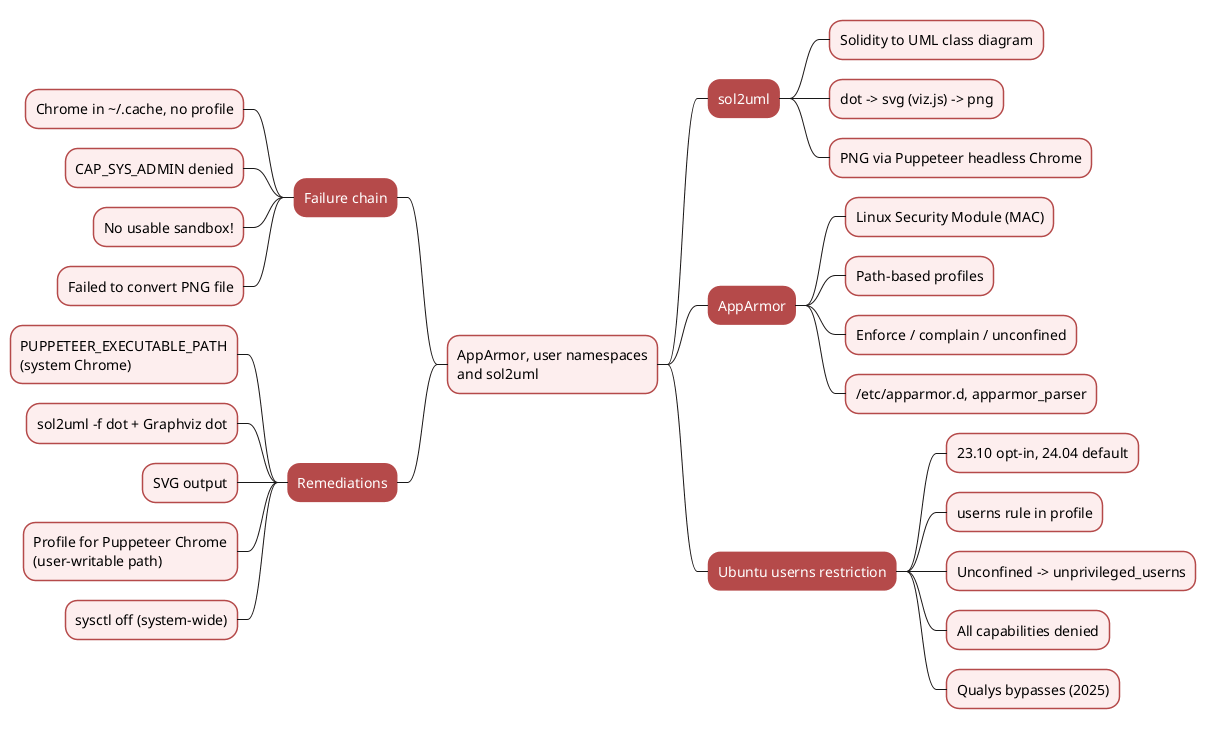
CAP_SYS_ADMIN, and Chrome exits withNo usable sandbox!. The audit log shows both the profile transition and the denial. - Three remediations keep the protection: point
PUPPETEER_EXECUTABLE_PATHat a profiled browser, render sol2uml’s DOT output with Graphvizdot, or export SVG. Each was tested. - Two weaken it: a profile for the downloaded Chrome, whose user-writable path lets any process of that user claim the permission, and the global sysctl, which removes the restriction for every program.
Annex
Key Terms
| Term | Definition |
|---|---|
| Linux Security Module (LSM) | A kernel framework that lets security modules add access checks at hooks inside the kernel, after the standard Unix permission checks. |
| Mandatory access control (MAC) | Access rules defined by the administrator that a process cannot change or lift, as opposed to discretionary rules set by a file’s owner. |
| AppArmor | The LSM that Ubuntu enables by default; it confines programs identified by their executable path, using text profiles. |
| Profile | An AppArmor policy attached to an executable path, listing the files, capabilities, network access and namespace operations the program may use. |
| Enforce / complain mode | Enforce mode blocks and logs what a profile does not allow; complain mode only logs. |
| Unconfined | The state of a program with no AppArmor profile, restricted only by the standard Unix permissions. |
| Capability | One of the privileges into which Linux splits root’s power, such as CAP_SYS_ADMIN or CAP_NET_ADMIN, each checked separately by the kernel. |
| User namespace | A kernel feature that gives a process its own user and group ID mapping, so it can be root with full capabilities inside the namespace while remaining unprivileged on the host. |
| Unprivileged user namespace | A user namespace created by a process without CAP_SYS_ADMIN on the host, the case Ubuntu restricts. |
userns rule |
The AppArmor 4 and later profile rule that allows a confined program to create user namespaces with capabilities. |
unprivileged_userns profile |
The profile Ubuntu moves an unconfined program into when it creates a user namespace; it denies every capability. |
flags=(unconfined) |
A profile flag that leaves a program unrestricted while still naming it, used to grant userns without confining anything else. |
| Chrome sandbox | Chrome’s isolation of its renderer processes; on Linux it uses namespaces, or a setuid helper as a fallback, and Chrome refuses to start without either. |
| Puppeteer | A Node.js library that downloads and drives a headless Chrome, used by sol2uml’s PNG conversion. |
| DOT | The text language Graphviz uses to describe graphs; sol2uml can stop at this stage with -f dot. |
Frequently Asked Questions
Q: Why does sol2uml need a browser at all?
Only for PNG output. sol2uml lays out the diagram as SVG with a WebAssembly build of Graphviz, then converts the SVG to PNG by opening it in a headless Chrome through Puppeteer and capturing the result. The -f dot and -f svg outputs never start a browser.
Q: AppArmor confines programs that have a profile. Why does it affect a program that has none?
Since Ubuntu 23.10, the restriction applies precisely to programs without a profile. An unconfined process that creates a user namespace is moved by the kernel into the unprivileged_userns profile, which denies every capability. Having no profile is what triggers the restriction, and having a profile with a userns rule is what lifts it.
Q: The namespace is created successfully. Why does Chrome still fail?
Because the namespace is useless to it. Chrome’s sandbox needs CAP_SYS_ADMIN inside the new namespace to create further namespaces and change the renderer’s root. Inside unprivileged_userns that capability is denied, which is the DENIED ... capname="sys_admin" line in the audit log. With the setuid helper also unavailable, Chrome has no sandbox and exits.
Q: Why does PUPPETEER_EXECUTABLE_PATH=/opt/google/chrome/chrome fix it without changing any setting?
Ubuntu ships a profile named chrome attached to exactly that path, with a userns rule. The installed Google Chrome is therefore allowed full-capability user namespaces, and its sandbox starts. The binary Puppeteer downloads sits in the user’s cache, a path no profile covers, so it is not.
Q: Why is a profile for Puppeteer’s Chrome weaker than using the system Chrome, when both grant the same userns permission?
Because AppArmor identifies programs by path, and the two paths have different owners:
/opt/google/chrome/chromeis owned by root. Only an administrator can replace the binary that receives the permission.~/.cache/puppeteer/chrome/.../chromeis in the user’s home directory. Any process running as that user can write its own binary there and receive the permission.
The second case hands the capability the restriction protects to whatever code runs as the user, including a compromised npm dependency.
Q: Which remediation should a project use in its documentation scripts?
Rendering the DOT output with Graphviz dot is the most portable: it removes the browser from the toolchain, needs no root and no Chrome, and behaves the same on a workstation and in CI. Setting PUPPETEER_EXECUTABLE_PATH is quicker on a single machine with Google Chrome installed. Disabling the sysctl is only appropriate as a temporary diagnostic.
References
Ubuntu and AppArmor
- AppArmor project
- Ubuntu 23.10: restricted unprivileged user namespaces, Canonical, 9 October 2023
- Understanding AppArmor User Namespace Restriction, Ubuntu Discourse
- Three bypasses of Ubuntu’s unprivileged user namespace restrictions, Qualys, 2025
Chrome and Puppeteer
- AppArmor User Namespace Restrictions vs. Chromium Developer Builds, Chromium documentation
- Puppeteer
Tools
Related articles
- Advanced GNU/Linux Security - SECCOMP and Linux Security Modules (LSM)
- Linux Isolation Primitives - Defense in Depth Beyond the Castle Model
- GNU/Linux Base Security Primitives - Authentication, Permissions, ACLs, Attributes, Capabilities
- Tools to create documentation for Solidity Smart Contracts
You might also enjoy