GNU/Linux Base Security Primitives - Authentication, Permissions, ACLs, Attributes, Capabilities
UNIX was designed as a simplified version of MULTICS, the first operating system built with security in mind. Where MULTICS used up to eight protection levels and complex file access rights, UNIX collapsed the model to two privilege levels (root and user) and a compact rwx permission scheme. That simplification made UNIX practical, but it also made it permissive, and the security needs of modern systems pushed GNU/Linux to reintroduce, piece by piece, mechanisms that recall some of what MULTICS already had. This article surveys the base security primitives of GNU/Linux: login and authentication, POSIX file permissions, access control lists, extended attributes, and capabilities. Each is presented with its adversary model and its trade-offs.
This article has been made with the help of Claude Code and several custom skills
GNU/Linux in One Paragraph
GNU/Linux is a UNIX clone made of the GNU project (started 1983) and the Linux kernel (1991). The kernel is monolithic: drivers, system calls, and memory management run in a single kernel address space. It follows the POSIX standard (as do UNIX, BSD, Windows, and macOS to varying degrees) and ships in many distributions (Slackware, Debian, Ubuntu, Red Hat). Because the inherited UNIX model is too permissive for current threat models, GNU/Linux layers additional protection mechanisms on top of it, recovering several MULTICS features and answering new adversary models. The primitives below are the base of that layering, the ones an administrator meets first.
Login and Authentication
Authentication establishes who is interacting with the system. The historical access paths illustrate the progression toward stronger guarantees:
- Terminal (virtual): the local console.
- telnet: a remote login service on TCP port 23, transmitted in cleartext. Credentials travel unencrypted, so it is unsuitable for hostile networks.
- Secure Shell (SSH), 1995: a service on TCP port 22 that provides confidentiality, authentication, and integrity through cryptography. It is the standard replacement for telnet.
- PAM (Pluggable Authentication Modules): a modular framework that lets administrators compose authentication steps (password, one-time token, biometric driver) without changing each application.
Adversary model. Unauthorized people must not access the system, and every legitimate user must be identified.
Security primitive. A login process (login, sshd, PAM stack) verifies a shared secret: a password, a cryptographic key, or a fingerprint.
Trade-offs. Authentication is simple in principle, modular through PAM, and sometimes cryptographically secure (SSH). Against that, it is a critical service (its compromise is a full breach), it depends on a shared secret, and it becomes complex when cryptography is involved (SSH) or when device drivers are needed (PAM modules).
POSIX File Permissions
The core of UNIX access control is a 9-bit permission set attached to every file, split across three classes and three rights.
Adversary model. Grant limited access (read, write, execute) to files according to users and groups.
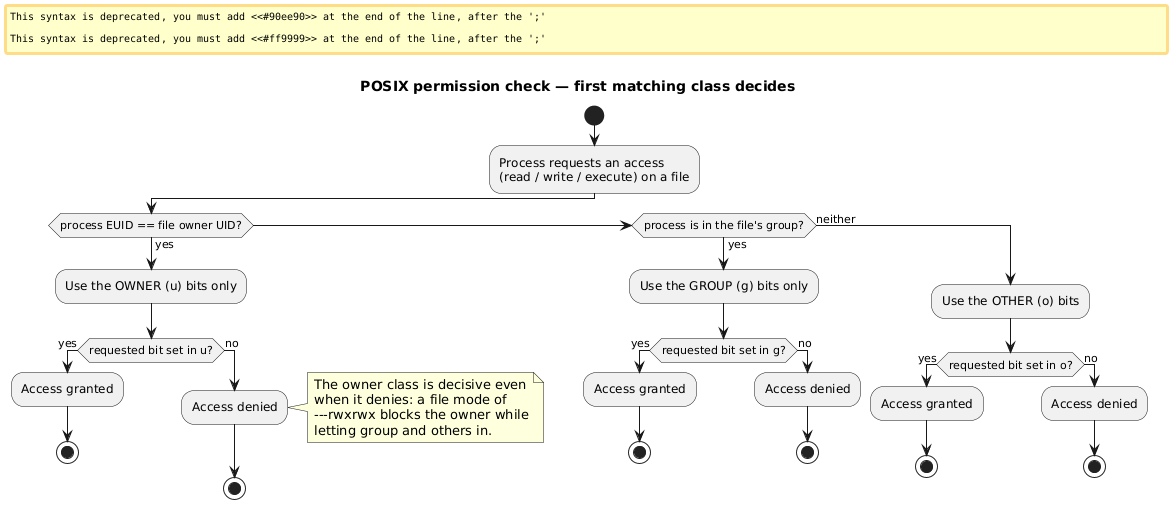
The classes and rights. Each file has an owner (u), a group (g), and everyone else (o, meaning not the owner and not in the group). Each class carries three bits: read (r), write (w), execute (x).
-rwxr-xr-x  2 alice vip 4096 Feb 25 10:36 tool.sh
 │└┬┘└┬┘└┬┘
 │ u  g  o      u = owner (alice)
 │              g = group (vip)
 │              o = other (not alice, not in vip)
 └ file type
The kernel does not combine the three classes. It selects the first matching class and uses only that class’s bits, which produces a subtlety worth internalizing: an owner can be locked out of their own file (mode ---rwxrwx) even though group and others have full access, because the owner class matches first and denies.
Octal and Symbolic chmod
Permissions are changed with chmod, using either an octal value or a symbolic expression. Each three-bit group maps to one octal digit:
| Bits | Symbolic | Octal |
|---|---|---|
--- |
(none) | 0 |
--x |
x |
1 |
-w- |
w |
2 |
-wx |
wx |
3 |
r-- |
r |
4 |
r-x |
rx |
5 |
rw- |
rw |
6 |
rwx |
rwx |
7 |
chmod 400 file.txt      ->  -r--------    (owner read only)
chmod 644 file.txt      ->  -rw-r--r--    (owner rw, group/other r)
chmod 755 file.txt      ->  -rwxr-xr-x    (owner rwx, group/other rx)

chmod u=rwx,go=rx file.txt   ->  -rwxr-xr-x    (symbolic equivalent of 755)
chmod u+w file.txt           ->  add write for the owner
chmod g+r,o-r file.txt       ->  add group read, remove other read
Ownership itself is changed with chown (and chgrp), and the user/group database lives in the flat files /etc/passwd and /etc/group.
The Special Bits: Sticky, SGID, SUID
Three extra bits sit above the nine permission bits and change how execution and directory writes behave.
Sticky Bit
Adversary model. In a directory writable by many (the canonical case is /tmp), a user with write permission can rename or delete other users’ files, since directory write permission normally allows that.
Security primitive. The sticky bit, a repurposing of an older mechanism (it once kept program text resident in swap), restricts deletion and renaming inside a directory to the file’s owner.
chmod +t  /my-protected-directory
chmod 1777 /my-protected-directory   ->  drwxrwxrwt   (sticky shown as 't')
chmod 1770 /my-protected-directory   ->  drwxrwx--T   ('T' = sticky without other-execute)
SGID (Set-Group-ID)
On a file, SGID makes the program run with the file’s group rights during execution, which lets a user act as a temporary member of a group (for example tty for terminal writes) without holding that membership permanently. This is least privilege applied to group rights.
chmod g+s ./program     ->  -r-xr-sr-x   (SGID shown as 's' in the group-execute slot)
chmod 2505 ./program    ->  -r-x--Sr-x   ('S' = SGID without group-execute)
On a directory, SGID changes inheritance: every file and subdirectory created inside inherits the directory’s group by default, which is convenient for keeping a shared directory uniform for a group.
chmod g+s ./shared-directory -> dr-xr-sr-x new entries inherit group 'vip'
SUID (Set-User-ID)
Adversary model. A user sometimes needs another identity temporarily, even root’s (passwd, su, sudo, mount). Granting that privilege permanently violates least privilege.
Security primitive. When the SUID bit is set on a program, the program runs with the rights of the file’s owner rather than the caller. The classic example is passwd, owned by root, which an ordinary user runs to edit the root-owned /etc/shadow.
chmod u+s ./program     ->  -rwsr-xr-x   (SUID shown as 's' in the owner-execute slot)
chmod 4455 ./program    ->  -r-Sr-xr-x   ('S' = SUID without owner-execute)
The mechanism rests on the difference between the real UID (the caller) and the effective UID (used for permission checks). At exec, the kernel sets the effective UID to the file owner.
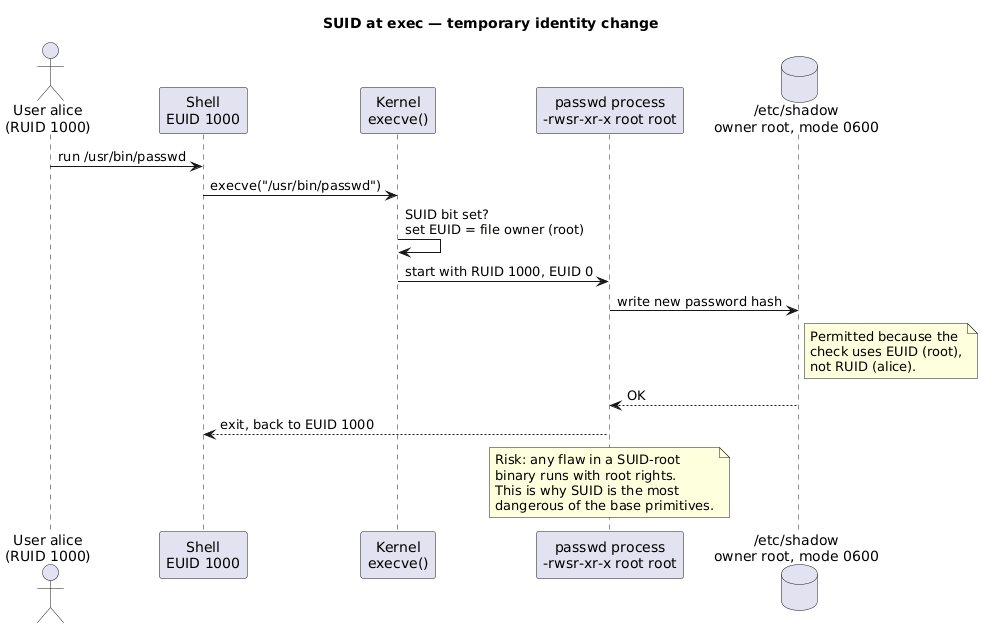
Trade-offs of the permission family (chown/chmod/SUID/SGID/sticky): the model is simple, widely known across operating systems, manages users and groups through /etc/passwd and /etc/group, and can transfer privileged rights to specific programs. The drawbacks are sharp: SUID and SGID are dangerous because they lean on the all-or-nothing root/user duality (any flaw in a SUID-root binary yields full root), SGID has a confusing double meaning (file vs directory), the sticky bit is a reused mechanism that is little used today, group management becomes laborious as the user count grows, and a group cannot contain other groups.
POSIX Access Control Lists (ACLs)
The owner/group/other model is coarse: it cannot express “grant access to this one extra user” or “deny exactly this user” without creating new groups.
Adversary model. Finer-grained rights are needed (also for compatibility with other operating systems), including default rights applied to new files in a directory.
Security primitive. ACLs add per-user and per-group access control entries to files and directories, enforced by the kernel. They depend on the filesystem and are limited in number (32 entries on ext2/ext3). Two commands manage them: getfacl and setfacl.
$ setfacl -m u:bob:- ok-for-vip-but-not-bob.txt   # deny user bob explicitly
$ getfacl ok-for-vip-but-not-bob.txt
# file: ok-for-vip-but-not-bob.txt
# owner: alice
# group: alice
user::rw-
user:bob:---        <- named-user entry for bob: no access
group::r--
mask::r--           <- upper bound on all named/group entries
other::r--
The presence of an ACL is signalled by a trailing + in the ls -l mode string (-rw-r--r--+). The mask entry caps the effective rights of all named users and groups: an entry may grant rwx, but if the mask is r--, the effective right is r--. Default entries on a directory (the default: lines) become the starting ACL of newly created files inside it:
# file: somedir/
# flags: -s-
user::rwx
user:joe:rwx        #effective:r-x
group::rwx          #effective:r-x
group:cool:r-x
mask::r-x
other::r-x
default:user::rwx
default:user:joe:rwx    #effective:r-x
default:group::r-x
default:mask::r-x
default:other::---
Trade-offs. ACLs give greater granularity, allow access to a file by several distinct groups, are known across operating systems, and have a simple interface (getfacl/setfacl). Costs: file access is slower, copying a file can lose its ACL (the properties do not always travel with the data), and the model is more complex to maintain.
Extended Attributes
Standard write permission is atomic: a process either may modify a file or may not. Some security goals need more than that binary right.
Adversary model. Additional file behaviours are useful, such as immutability or append-only logging, which the rwx model cannot express.
Security primitive. Extended attributes add kernel-enforced flags to files and directories. They are filesystem-dependent and are managed with lsattr and chattr. The most security-relevant flags:
| Flag | Meaning |
|---|---|
a |
append only (data may be added, not overwritten or truncated) |
c |
compressed (kernel compresses the file) |
i |
immutable (no modification, deletion, rename, or link) |
s |
secure deletion (overwrite blocks on delete) |
$ chattr +i immutable.txt
$ lsattr immutable.txt
----i---------e------ immutable.txt

$ chattr +a append-only.txt        # useful for log files
$ lsattr append-only.txt
-----a--------e------ append-only.txt
Trade-offs. Extended attributes are a known primitive on other operating systems with a simple interface. However, they add complexity, depend heavily on the filesystem (a portability concern), and crucially root can clear them: the immutable flag protects against accidents and unprivileged tampering, not against an attacker who already holds root. They remain little used in practice.
Capabilities
The root/user duality is the root cause of the SUID danger: a program that needs one privileged operation (change an IP address, sniff traffic, reboot) has to be granted all of root.
Adversary model. Coarse privilege means an adversary who subverts a SUID-root tool gains total access for what should be a narrow task. Least privilege calls for splitting root into independent rights.
Security primitive. Capabilities decompose root’s omnipotence into roughly forty distinct units, each grantable on its own. A few network examples:
CAP_NET_BIND_SERVICE: bind a socket to a privileged port (below 1024).CAP_NET_RAW: use RAW and PACKET sockets, and bind to any address for transparent proxying.CAP_NET_ADMIN: network administration (interface configuration, firewall, routing tables, promiscuous mode, type-of-service).
Capabilities are attached to files and processes and are transparent to the program. They are managed with getcap and setcap, replacing the need for su, sudo, SUID, and SGID in many cases:
$ capsh --print          # list current capabilities
$ getpcaps 1234          # capabilities of a running process
$ getcap  file           # capabilities on a file

$ setcap cap_net_raw+ep /usr/bin/tcpdump   # grant exactly one right
$ getcap /usr/bin/tcpdump
/usr/bin/tcpdump cap_net_raw=ep
Granting tcpdump only CAP_NET_RAW lets it capture packets without ever running as root, which contains the blast radius if it is compromised. The privilege model therefore moves from coarse to fine across three rungs.
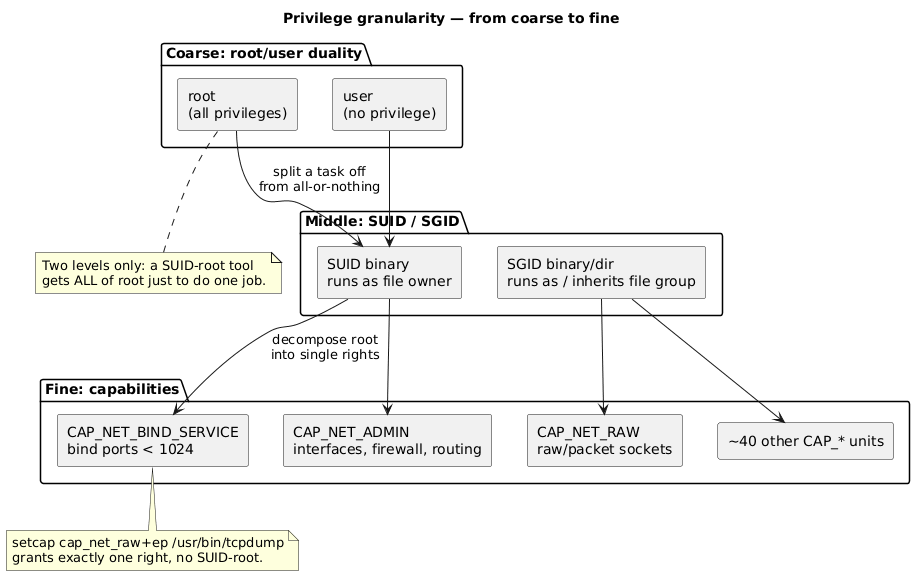
Trade-offs. Capabilities give finer granularity than root/user, are more secure than su/sudo/SUID/SGID, can be administered on both files and processes, are transparent to programs, and have a simple interface (getcap/setcap). The costs are the complexity of the three capability sets (Permitted, Effective, Inheritable) attached to each process, the difficulty of mastering the OS behaviour hidden behind capabilities, and the fact that some capabilities are overloaded (notably CAP_SYS_ADMIN, which bundles so much that it is close to root again).
How the Primitives Relate
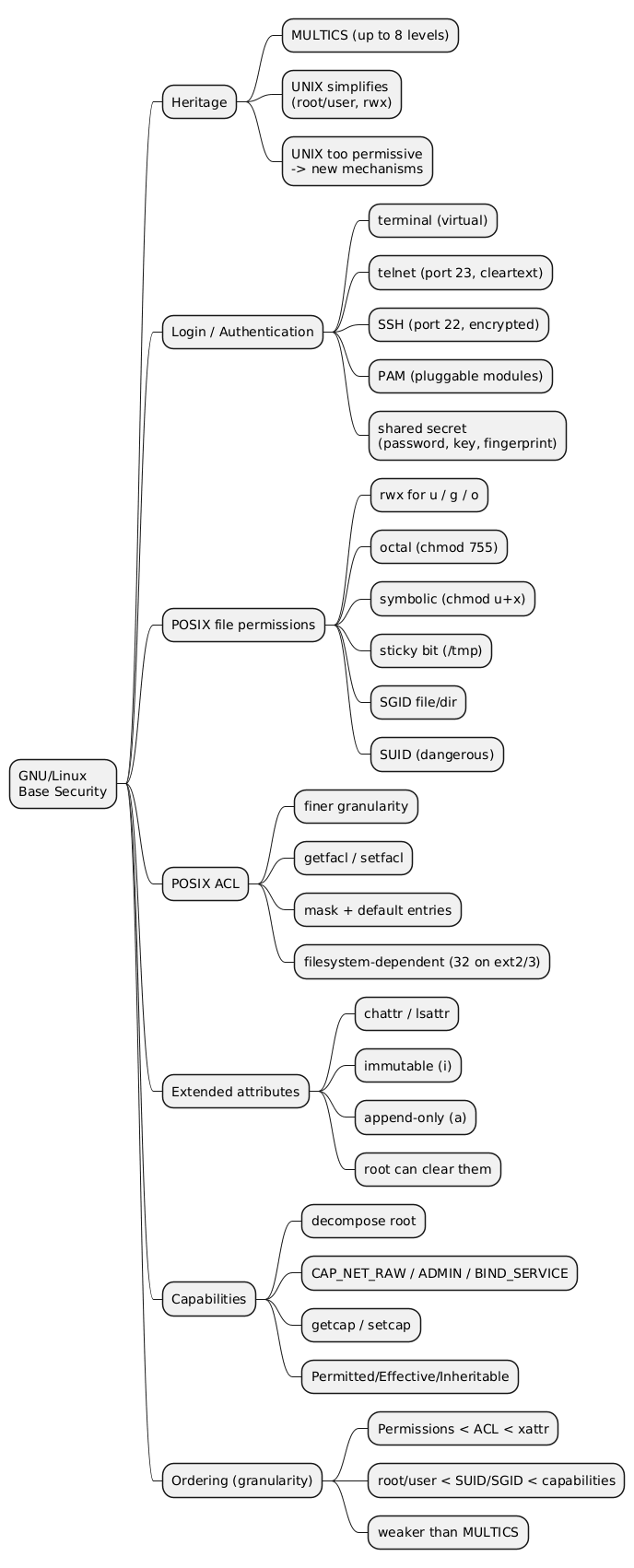
The lecture closes by ordering the primitives along two granularity axes, from coarse to fine:
- File access: plain permissions, then ACLs, then extended attributes.
- Privilege: root/user, then SUID/SGID, then capabilities.
Authentication sits before all of these as the gate that establishes identity. Several of the finer mechanisms (ACLs, extended attributes, capabilities) are optional refinements that share two properties: a relatively simple user interface and compatibility with other operating systems. The recurring theme is that GNU/Linux security is less strict than MULTICS by design, and that the effectiveness of several of these primitives is relative. An immutable flag a root attacker can clear, or a capability set that is hard to reason about, protects against some adversaries and not others, which is exactly why the adversary model must be stated before a primitive is judged.
Conclusion
The base security of GNU/Linux is a stack of primitives layered over a deliberately simple UNIX foundation. Authentication (terminal, telnet, SSH, PAM) verifies identity through a shared secret. POSIX permissions assign rwx rights to owner, group, and other, with the first-matching-class rule and the sticky, SGID, and SUID bits adjusting execution and directory behaviour. ACLs add per-user and per-group entries with masks and defaults; extended attributes add immutability and append-only behaviour; capabilities split root into narrow units. The primitives differ in granularity and in the adversaries they actually stop: SUID rests on the root/user duality that capabilities exist to break, and an immutable flag does not hold against root. Choosing among them is a matter of matching the primitive to a stated threat model rather than assuming any single one is sufficient.
Frequently Asked Questions
Q: Why is telnet considered unsuitable for authentication on untrusted networks, and what replaced it?
telnet (TCP port 23) transmits everything, including credentials, in cleartext, so anyone able to observe the network path can read the password. SSH (TCP port 22, introduced in 1995) replaced it by adding cryptography that provides confidentiality, authentication, and integrity, which keeps the shared secret and the session contents protected in transit.
Q: A file has mode ---rwxrwx. Can its owner read it?
No. The kernel checks the three permission classes in order (owner, then group, then other) and uses only the first one that matches. The owner matches first, and the owner bits are ---, so the owner is denied even though group and other have full rwx. The classes are not combined, so a more permissive group or other class does not rescue the owner.
Q: What is the difference between SGID on a file and SGID on a directory?
On a file, SGID makes the program execute with the file’s group identity, granting the caller that group’s rights temporarily (for example to write to tty). On a directory, SGID changes inheritance: new files and subdirectories created inside automatically take the directory’s group rather than the creator’s primary group, which keeps a shared directory uniform for a team. The same bit therefore has two unrelated meanings depending on the target, which the lecture lists as a drawback.
Q: How do the real UID and effective UID make SUID work?
A process carries a real UID (who started it) and an effective UID (used for permission checks). When a program with the SUID bit is executed, the kernel sets the effective UID to the file’s owner while the real UID stays the caller’s. Permission checks then use the effective UID, so a user running root-owned passwd temporarily gains the effective identity needed to modify /etc/shadow, without becoming root permanently. The danger is that any vulnerability in such a binary executes with the owner’s full rights.
Q: What does the mask entry in a POSIX ACL do, and why does an ACL entry sometimes show a different effective right?
The mask is an upper bound on the rights granted by all named-user, named-group, and owning-group entries. An ACL entry can list rwx, but the effective right is the intersection of that entry with the mask. If user:joe is granted rwx while mask::r-x, joe’s effective right is r-x, which getfacl annotates with #effective:r-x. The mask lets an administrator tighten all extended entries at once without editing each entry.
Q: Combining capabilities and SUID, why are capabilities considered a more secure way to grant tcpdump packet-capture rights than making it SUID-root?
A SUID-root tcpdump runs with the entire root privilege set merely to open raw sockets, so a flaw in it gives an attacker all of root. Capabilities decompose root into independent units, so setcap cap_net_raw+ep /usr/bin/tcpdump grants only CAP_NET_RAW, the single right packet capture needs. The program never holds root, and a compromise is bounded by that one capability instead of escalating to full system control. This is least privilege made concrete: the privilege granted matches the task instead of the all-or-nothing root/user duality that SUID depends on. The caveat is that some capabilities (such as CAP_SYS_ADMIN) are broad enough to approach root again, so the choice of capability still matters.
References
- HEIG-VD - “Sécurité des systèmes d’exploitation”
- GNU Project
- OpenSSH
- Linux PAM
- capabilities(7) — man7.org
- acl(5) — man7.org
- chattr(1) — man7.org
- Claude Code
Related articles
You might also enjoy