Linux Isolation Primitives - Defense in Depth Beyond the Castle Model
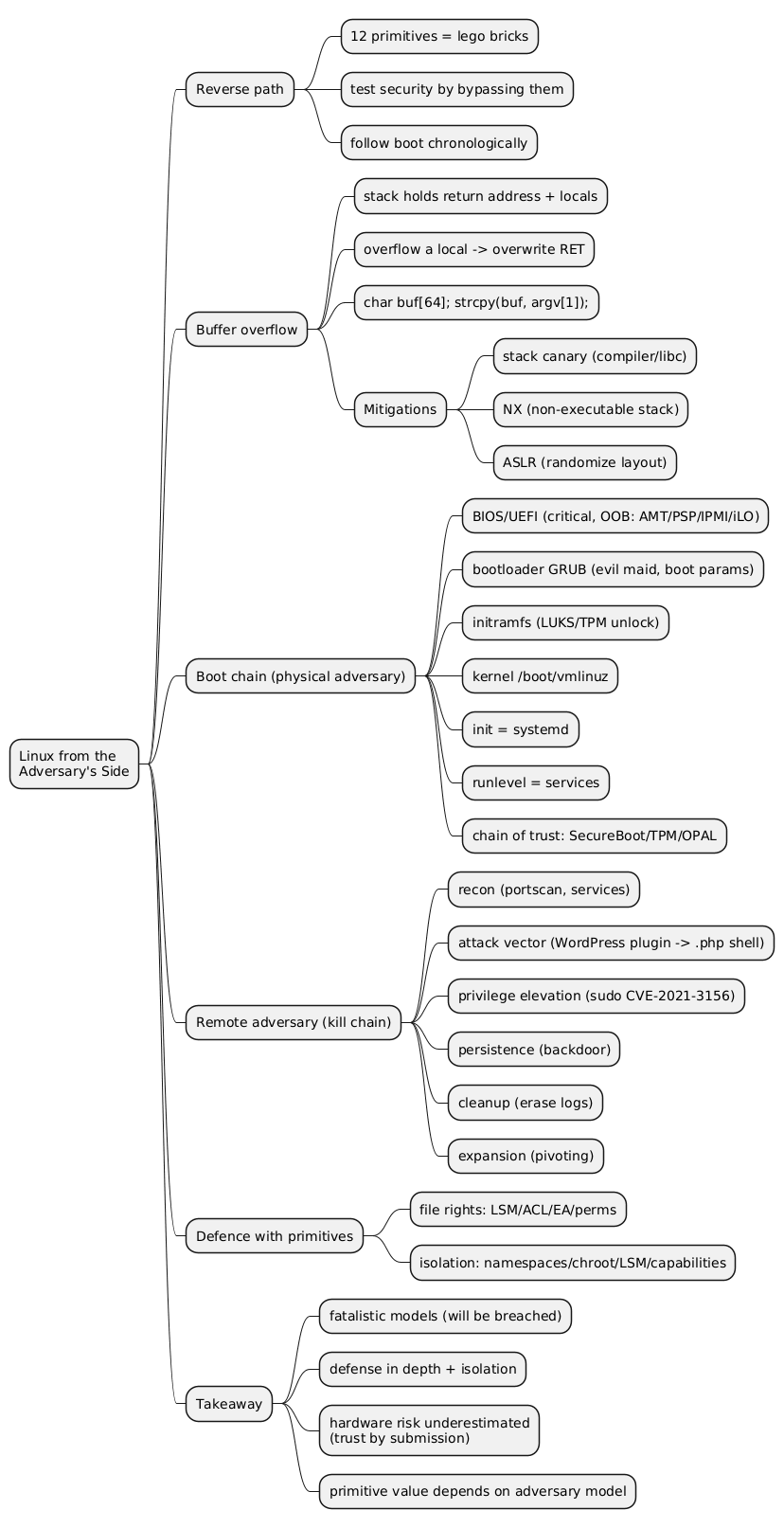
Classical operating-system security follows a castle model: walls are raised around the perimeter and the entry points (login, SSH, web services) are guarded. That model assumes the inside is trustworthy, which stops holding the moment a program is diverted from its intended behaviour through a buffer overflow or a misconfiguration. Defense in depth answers this by adding internal barriers, so a single compromise does not grant control of the whole system. This article surveys the Linux primitives that implement those internal barriers (mount options, chroot, netfilter, cgroups, and namespaces) and shows how they compose into containers, hypervisors, and the compartmentalized desktop of Qubes OS.
This article has been made with the help of Claude Code and several custom skills
From Perimeter Defense to Internal Isolation
A threat model (or adversary model) exists to verify and evaluate the effectiveness of a security solution: it states what the attacker can do, and a defense is meaningful only against an explicitly stated adversary. The castle model defends the perimeter, but once an adversary obtains code execution inside, no further obstacle stands between the foothold and the rest of the system.
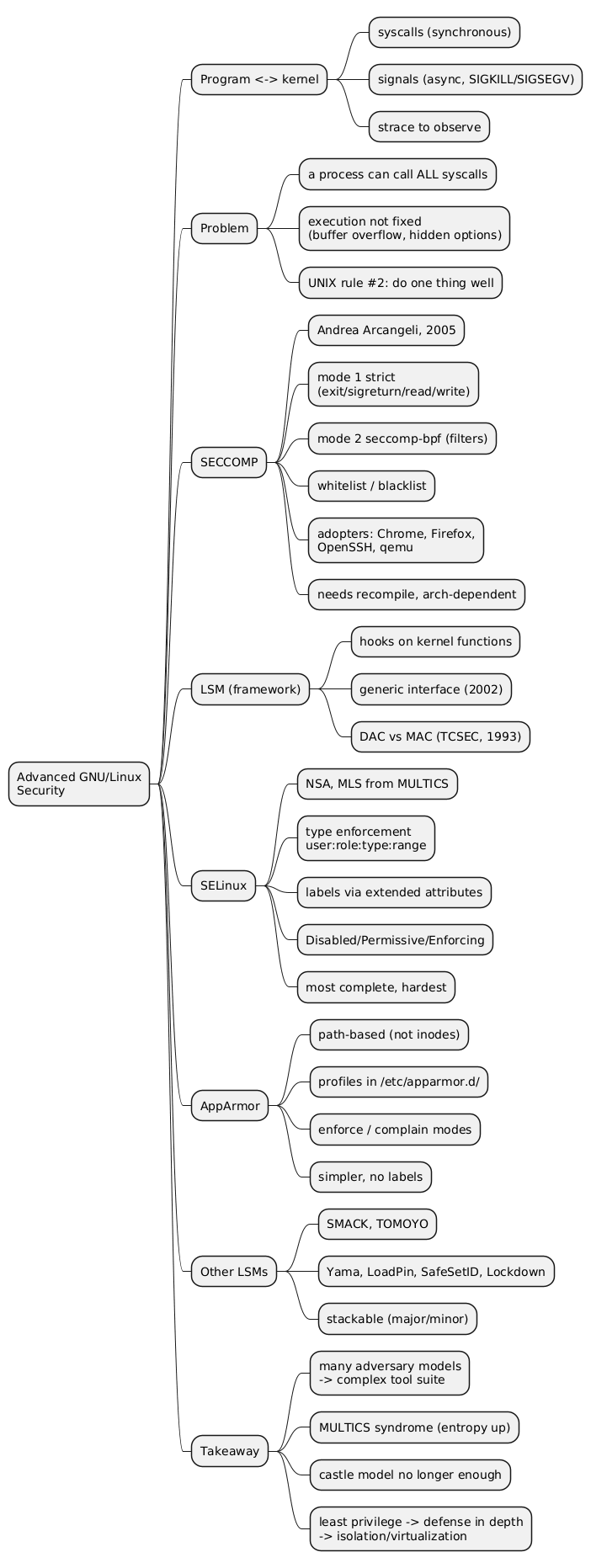
Defense in depth adopts isolation of processes and resources as its strategy. Two earlier mechanisms already push in this direction: SECCOMP restricts the set of system calls a program may issue to the kernel, and Linux Security Modules (LSM) such as AppArmor and SELinux provide fine-grained control over the rights of users, files, and processes. These are powerful, but they are also heavy to operate and they sit awkwardly with the UNIX philosophy of small composable tools. The primitives discussed here are an attempt to obtain isolation from simpler, more orthogonal building blocks.
The primitives differ in what they isolate (files, network, resources, kernel view) and in how strongly they isolate, which is largely a function of how much of the kernel remains shared. The figure below orders them from weakest to strongest isolation along that axis.
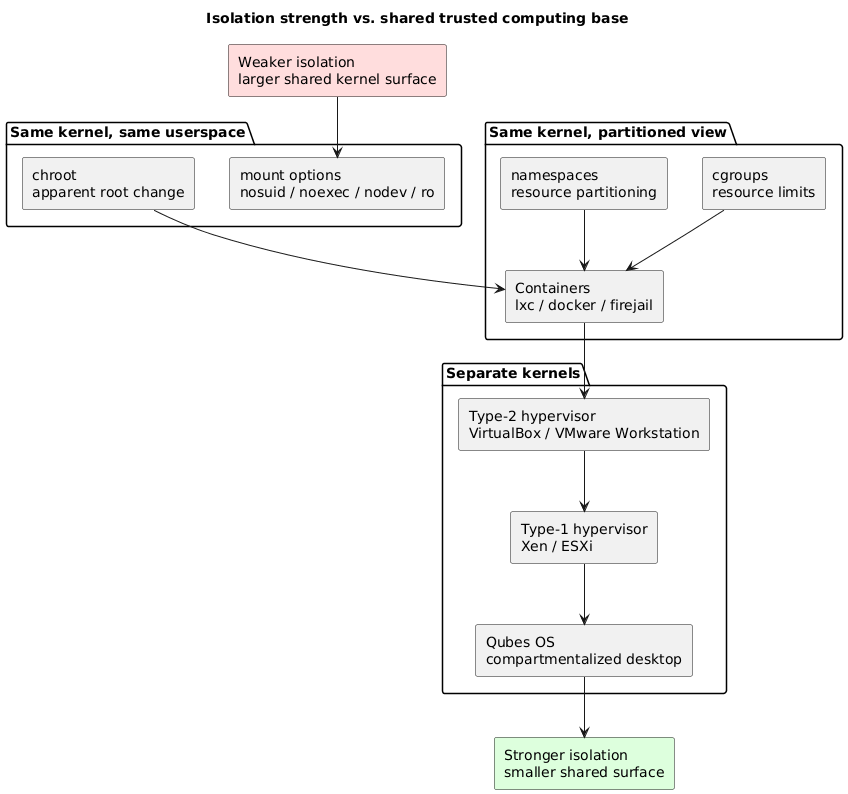
Mount Options as a Filesystem Boundary
mount is the system command that attaches a disk to the filesystem tree; mounting the root filesystem is a critical step during UNIX boot. Today the same command also attaches USB keys and shared network disks, and under the UNIX rule that everything is a file, the contents of a mounted volume can carry more than inert data.
Adversary model. What happens if a mounted disk contains a set-user-ID (SUID) executable, a device node, or executable files? A SUID binary placed on a removable disk and executed could run with elevated privileges; a device node could expose raw hardware; arbitrary executables under a user-writable location widen the attack surface.
Security primitive. The mount operation accepts restrictions that defuse exactly these cases:
nosuid: the set-user-ID and set-group-ID bits on files are ignored.noexec: no program on the volume may be executed.nodev: device special files on the volume are not interpreted as devices.ro: the volume is mounted read-only.
These are typically declared per filesystem in /etc/fstab:
# <device>      <mount point>   <type>  <options>                       <dump> <pass>
/dev/sdb1       /media/usb      ext4    rw,nosuid,noexec,nodev          0      2
tmpfs           /tmp            tmpfs   rw,nosuid,noexec,nodev,size=512M 0      0
Trade-offs. On the positive side, mount options block the import of executable files, SUID binaries, and device nodes; the mechanism is simple, and it gives a coarse form of isolation (for example, no executables under /home). On the negative side, it is laborious: the restrictions must be remembered and applied for every volume, across /etc/fstab and the rules that govern automounting (udev). Changing the mount configuration also requires a privileged operation, available through the relevant capability rather than full root.
chroot: Filesystem Confinement and Its Limits
By default a program can reach the entire filesystem, constrained only by the root/user duality of UNIX permissions. Under the principle of least privilege there is no reason to grant that reach when a service needs only a fraction of the tree. The chroot system call sets a new apparent root directory / for a process, isolating it within a subtree.
The essential caveat appears on the slide and deserves emphasis: chroot is not a security primitive. It was designed to present a restricted filesystem view, not to contain a hostile process. It is frequently misunderstood and misused as if it were a sandbox. In particular, a confined process that retains root privileges can escape the chroot jail, for instance by acquiring a file descriptor to a directory outside the new root and then walking back out with repeated chdir("..") followed by a second chroot. The jail is therefore not airtight when the process is root.
Used carefully, chroot can still confine a service correctly: an SFTP-only server is a common example, where the daemon restricts each user to a subtree. It also lives alongside the heavier LSM approaches (AppArmor profiles are powerful but notoriously hard to generate for arbitrary services; SELinux is more powerful still and correspondingly more complex).
Trade-offs. chroot lets an administrator reconstruct a minimal filesystem for a service, it is a single system call, and it is simple. Against that, it is not a security tool, it is not airtight when the process is root, and applying it requires a privileged operation.
Netfilter: Kernel-Level Network Filtering
Some programs expose external network services that are enabled by default, which is the castle model again: a listening service is an open gate. An adversary who reaches such a service over the network may exploit it to take remote control of the system.
Netfilter is the in-kernel framework, introduced around 1998 to 2000, that filters network connections and performs access control (routing) over the system’s network traffic. Because the decision happens in the kernel on the packet path, filtering is fast and applies uniformly regardless of which userspace program owns the socket.
A broad set of userspace tools drives it: iptables, ebtables, and arptables for IP, Ethernet bridge, and ARP filtering respectively; the Uncomplicated Firewall (ufw) as an easier front end; and newer interfaces built on the in-kernel BPF machinery (bpfilter, nftables).
Trade-offs. Netfilter is performant, offers a wide tool selection, and is relatively standard across distributions; ufw lowers the barrier to entry. The costs are an extra layer of packet-handling complexity inside the kernel, an interface that is easy to get wrong (rule ordering mistakes are common), and the need for a privileged operation to change rules.
Control Groups (cgroups): Resource Accounting and Limits
Control groups monitor and limit access to resources using a hierarchical classification. They are an indirect security primitive: rather than blocking an action, they bound how much of a resource a group of processes can consume, which is the lever against resource-exhaustion (denial-of-service) behaviour from within. They generalize and improve older tools such as nice and /etc/security/limits.conf.
The set of controllers is visible through the kernel:
$ cat /proc/cgroups
#subsys_name    hierarchy       num_cgroups     enabled
cpuset          1               1               1
cpu             2               1               1
cpuacct         3               1               1
blkio           4               1               1
memory          5               1               1
devices         6               1               1
freezer         7               1               1
net_cls         8               1               1
perf_event      9               1               1
net_prio        10              1               1
hugetlb         11              1               1
pids            12              1               1
Each controller governs one resource class: CPU shares and CPU sets, block-device I/O, memory ceilings, the number of processes (pids, a fork-bomb defense), and device access (devices, which doubles as an access-control lever). The listing above shows the v1 layout with one hierarchy per controller; the later v2 unified hierarchy places all controllers under a single tree. cgroups are the resource-control half of what containers later assemble.
Namespaces: Partitioning the Kernel’s View
Namespaces are the isolation half. The primitive is inspired by the namespaces of Plan 9 from Bell Labs, the post-UNIX research system from Rob Pike, Ken Thompson, Dave Presotto, Phil Winterbottom, and Dennis Ritchie. Plan 9 had little commercial success but introduced revolutionary ideas grounded in the UNIX philosophy (every resource, including the display, is reachable through the file namespace). Many of those ideas were partially adopted by GNU/Linux, which is itself a UNIX clone; namespaces are one of them. They were integrated into Linux in 2002 and progressively improved from 2006 onward, which is when the term container enters the picture.
A namespace partitions a class of kernel resources so that processes inside it see only a limited, private slice. The available namespaces can be listed:
$ lsns
4026531834 time    # a clock distinct from the parent system
4026531835 cgroup  # isolation via cgroups (quotas / limits)
4026531836 pid     # process isolation (independent PIDs)
4026531837 user    # user / group isolation (UID / GID)
4026531838 uts     # hostname / domainname isolation
4026531839 ipc     # IPC isolation (POSIX message queues, etc.)
4026531840 mnt     # mounted-filesystem isolation (mount)
4026531992 net     # network isolation (virtual network, IP, routing, etc.)
The user namespace is the one that makes unprivileged containers possible: a process can be root inside its own user namespace while remaining unprivileged on the host. Three system calls manipulate namespaces: clone creates a new process in fresh namespaces, unshare detaches the calling process into new namespaces, and setns joins an existing namespace (the mechanism behind commands like docker exec).
The workflow below shows how these calls assemble an isolated process, combining namespaces with a cgroup, mount restrictions, a seccomp filter, and capability dropping. This is, in essence, what a container runtime does.
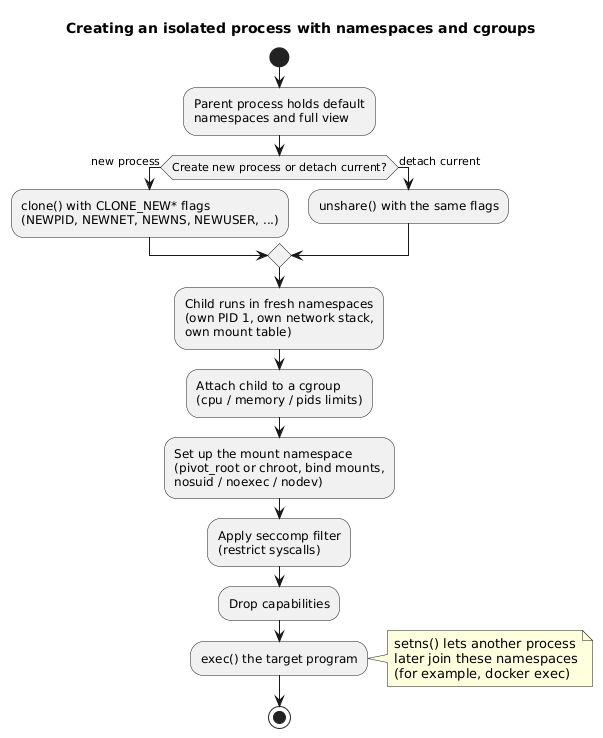
Trade-offs. Namespaces are well designed, their granularity is close to the kernel’s internal structure, and they compose cleanly with other primitives such as capabilities and cgroups. The downsides are practical: identifying which namespaces matter against a given adversary model is difficult, the primitive has little bearing on everyday use (where chroot already suffices), and the raw interface is complex enough that front ends such as lxc, lxd, docker, and firejail exist precisely to hide it.
The Virtualization Spectrum
Stacking the previous primitives yields a spectrum of virtualization approaches that trade performance against the size of the shared trusted computing base. The architectures differ in where the trust boundary falls.
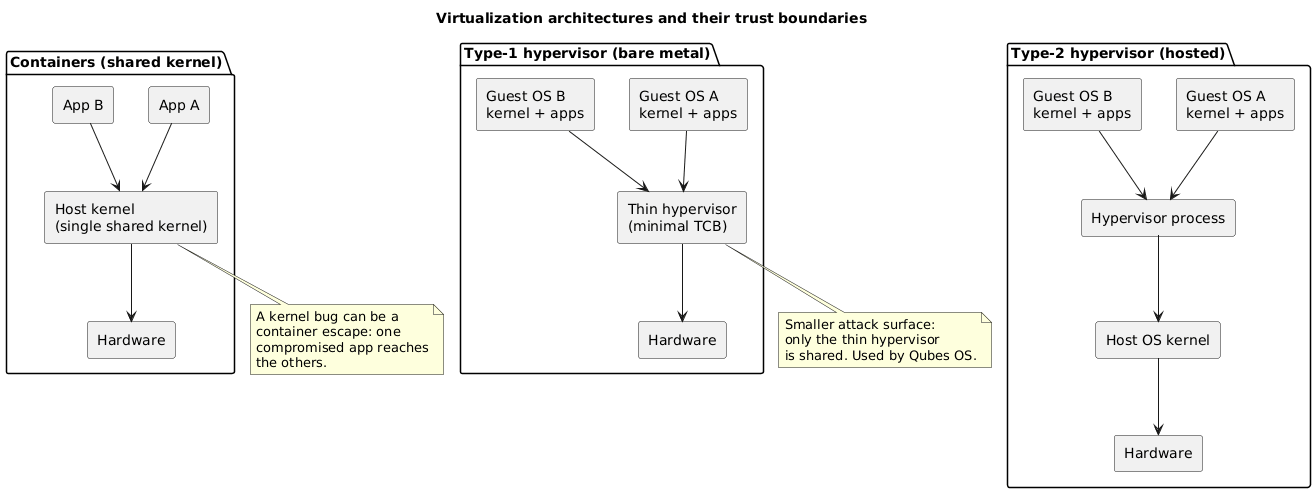
Containers (Isolators)
Containerization uses the security primitives just described (SECCOMP, AppArmor, SELinux, cgroups, namespaces, chroot) to isolate processes from one another. The defining property is that the kernel is shared by all containerized processes: a flaw in that single kernel lets an adversary controlling one container reach the others. Because the processes run natively, the speed is unmatched by any other isolation technique. The consequence of the shared kernel is that a container’s operating system must be compatible with the host’s. Containers can still communicate when wanted, through a virtual network or IPC. The mental model is the simulation of several machines per service over one shared kernel. Examples include lxc, lxd, docker, firejail, and mbox.
Type-2 Hypervisor (Hosted)
A type-2 hypervisor runs as an application on top of a host operating system, and each virtual machine carries its own complete system (boot firmware, disks, graphics card, network card). The host CPU and memory are directly accessible to the guests, although protection mechanisms block unauthorized access. This allows running other operating systems on the same machine, and even other CPU architectures through emulation. A vulnerability in a guest kernel does not reach the other guests, unless the flaw is in the host kernel or in a module used by the virtualization layer. These programs are extremely complex and exchange many services with the host (file transfer, resource sharing, clipboard). That exchange surface is where guest-to-host attacks live: escaping a guest to climb into the hypervisor. Examples include qemu/KVM, VirtualBox, and VMware Workstation.
Type-1 Hypervisor (Bare Metal)
A type-1 hypervisor reduces the host operating system to a strict minimum, often called bare metal. A simplified kernel does only what virtualization and device management require. The result is slower than containerization but faster than a type-2 hypervisor, and the security of the host improves precisely because functionality, and therefore attack surface, has been cut away. Examples include Xen, KVM, and VMware vSphere. (KVM is a Linux kernel module and is sometimes paired with qemu in a hosted configuration, so it spans both categories depending on deployment.)
Qubes OS
Qubes OS, proposed in 2010 by Joanna Rutkowska, applies isolation and virtualization to secure a graphical desktop workstation. It builds two layers of virtualization on a type-1 hypervisor (Xen) that separate hardware concerns (network isolation, USB) from software concerns (programs, services) according to trust levels. Each program runs in a domain matching its trust level (home, work, top-secret, tmp), an arrangement that echoes the multilevel security (MLS) model of Multics. Each domain is isolated in its own virtual machine. Qubes provides tools to manage these application VMs (appVMs), some of which are disposable sandboxes. A colour assigned to each domain’s window border gives an intuitive, always-visible indication of which trust level a window belongs to.
Composition and the Cost of Complexity
These primitives are designed to combine like building blocks: stack chroot, namespaces, cgroups, seccomp, and capabilities and a container emerges; place containers or guests on a hypervisor and stronger boundaries follow. Each composition produces a tool that is simpler to use than the primitives beneath it, but the underlying complexity grows quickly. A front end can hide a great deal of machinery:
$ ls -hl /usr/bin/firejail
-rwsr-xr-x 1 root root 456K Oct 22 20:32 /usr/bin/firejail

$ ls -lh /usr/bin/docker
-rwxr-xr-x 1 root root 52M Feb  4 04:41 /usr/bin/docker
The set-user-ID bit on firejail is itself a reminder that the convenience runs with elevated privilege. When the technical complexity (the entropy) of a security stack becomes this large, the conversation shifts toward security by obscurity and trust by submission, the posture of proprietary systems such as Windows, macOS, iOS, and Android. The closing observation of the lecture is that a security solution carrying the elegance and simplicity of UNIX remains worth pursuing, rather than accepting opacity as the price of isolation.
Conclusion
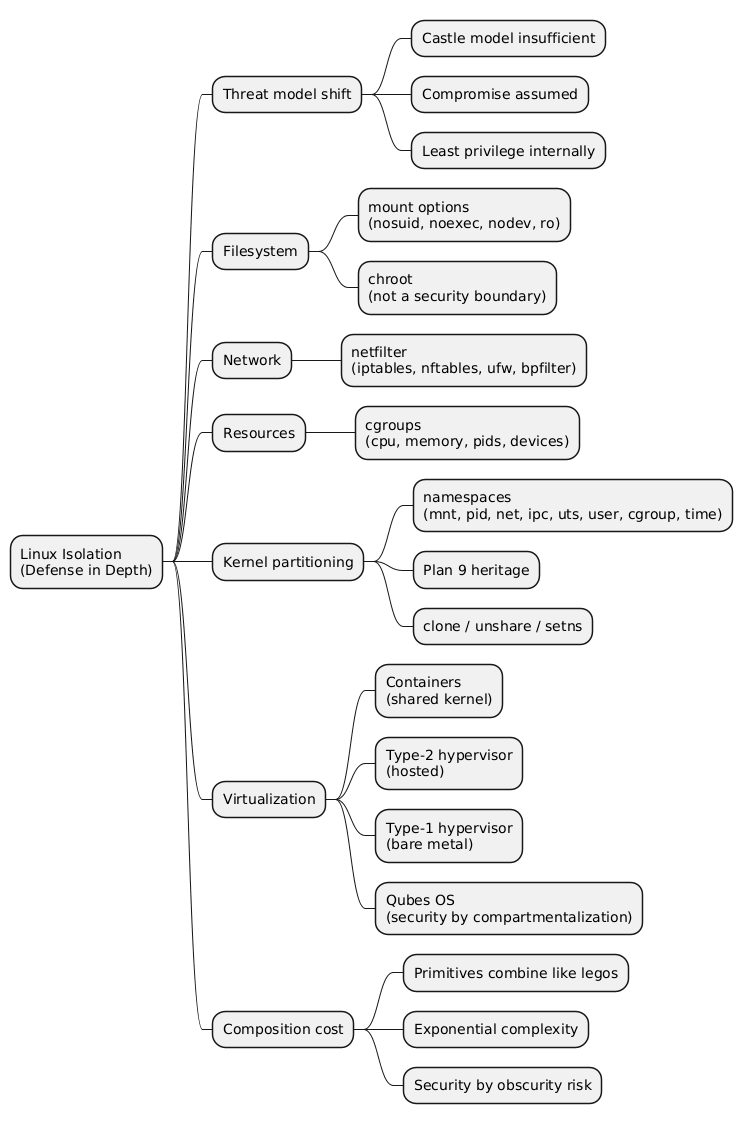
Linux offers a graduated set of isolation primitives, from the trivial to the intricate. Mount options and chroot operate within a single kernel and userspace and provide coarse filesystem boundaries, with the explicit caveat that chroot is a view-restriction tool rather than a containment boundary. Netfilter filters network access in the kernel. cgroups bound resource consumption, and namespaces partition the kernel’s view of resources; together they are the substrate of containers. Above them sits a virtualization spectrum that trades speed for a smaller shared surface: containers share the kernel, type-2 hypervisors share the host kernel, type-1 hypervisors share only a thin layer, and Qubes OS turns that thin layer into a compartmentalized desktop. The recurring tension is that composing simple primitives yields usable tools at the cost of complexity that grows faster than the convenience it buys.
Frequently Asked Questions
Q: What distinguishes the castle model from defense in depth?
The castle model concentrates protection at the perimeter, guarding entry points such as login, SSH, and web services while treating the interior as trusted. Defense in depth assumes the perimeter can be breached and adds internal barriers, so that code execution obtained inside one component does not automatically extend to the rest of the system. Isolation of processes and resources is the strategy that implements those internal barriers.
Q: Why is chroot described as not being a security primitive?
chroot was built to present a process with a restricted filesystem view by changing its apparent root directory, not to contain a hostile process. A process that keeps root privileges inside the jail can escape it, for example by holding a file descriptor to a directory outside the new root and walking back out with repeated chdir("..") and a second chroot. It can confine a cooperative service such as an SFTP daemon, but it does not constitute an airtight boundary against a privileged adversary.
Q: What is the difference between what cgroups isolate and what namespaces isolate?
They address two different halves of isolation. cgroups perform resource accounting and limiting (CPU, memory, block I/O, process count, device access) through a hierarchical classification, which bounds how much a group of processes can consume. Namespaces partition the kernel’s view of resources (PIDs, network stack, mount table, hostname, IPC, users) so a process sees only a private slice. A container runtime combines both: cgroups cap the resources, namespaces restrict visibility.
Q: Which namespace makes unprivileged containers possible, and why?
The user namespace. It maps user and group IDs so that a process can hold root (UID 0) inside its own namespace while remaining an unprivileged user on the host. Because the elevated rights exist only within the namespace, an ordinary user can create and own a container without being granted real root on the host, which removes the historical requirement of privilege for container creation.
Q: How does the shared kernel explain the security difference between a container and a type-1 hypervisor?
A container shares the single host kernel with every other container, so the entire kernel is part of the trusted computing base; one kernel vulnerability can become a container escape that reaches the other containers. A type-1 hypervisor shares only a thin virtualization layer with reduced functionality, so the attack surface common to all guests is much smaller, and a flaw in a guest kernel does not reach the others unless it lies in the hypervisor itself. The container is faster because its processes run natively, while the type-1 hypervisor trades some speed for a smaller shared surface.
Q: Combining the primitives, how is a container actually assembled from them, and where does Qubes OS sit relative to that construction?
A container runtime issues clone or unshare with the new-namespace flags to give the process a private PID space, network stack, and mount table, attaches the process to a cgroup that caps CPU, memory, and process count, restructures the filesystem view with pivot_root or chroot under nosuid/noexec/nodev mounts, applies a seccomp filter to limit system calls, and drops capabilities before exec. All of this still rests on the one shared kernel. Qubes OS sits a level higher: instead of sharing a kernel, it places each trust domain in its own virtual machine on a type-1 hypervisor (Xen), so the boundary between domains is a hypervisor boundary rather than a namespace boundary, at the cost of running full guest kernels.
References
- HEIG-VD - “Sécurité des systèmes d’exploitation”
- Netfilter / iptables project
- Uncomplicated Firewall (ufw)
- Plan 9 from Bell Labs
- Linux namespaces — man7.org
- Control groups (cgroups) — man7.org
- Qubes OS
- Multics
- Claude Code
Related articles
- How Fail2Ban Works — Architecture, Privilege Model and Residual Risk
- System Calls, Binary Images and Processes - How a Program Reaches the Kernel
- The Process Control Block, fork/exec/waitpid/exit and the Context Switch
- AppArmor on Ubuntu, User Namespace Restrictions, and Why sol2uml Cannot Export a PNG
You might also enjoy