Windows Credentials Protection - LAPS, WDigest, LSA Protection, Credential Guard and Protected Users
The previous article on Windows advanced authentication showed how to replace passwords at the front door with hardware-backed keys, and ended on a blunt point: the credentials and tokens those logons produce are still exposed. This article is the defensive counterpart. It covers the controls that protect credentials after authentication, both at rest and in memory: password policy, the Local Administrator Password Solution (LAPS), logon types and where secrets get cached, disabling WDigest, LSA Protection, Credential Guard, and account-discipline controls such as the Protected Users group.
Source and currency note. This article is based on the lecture SOS 2021 - 06 Windows credentials protection (JMB, HEIG-VD, May 2021), targeting Windows 10 / Server 2016-era domains. The mechanisms (RunAsPPL, VBS-based Credential Guard, Protected Users, LAPS) are still current, but defaults and packaging have changed: Credential Guard is enabled by default on many newer Windows 11 / Server SKUs, “Windows LAPS” is now built into the OS rather than an add-on, and Microsoft has begun deprecating NTLM. Treat version lists, registry specifics, and “available on” claims as a 2021 snapshot and verify against current Microsoft Learn docs before relying on them.
This article has been made with the help of Claude Code and several custom skills
Password policies
Credential protection starts before any memory or process hardening, with the strength of the secret itself. The lecture gives three axes.
- Complexity. Enforce a strong minimum: 10 characters for standard users, 12 for administrators, drawing from all character classes including symbols. Length dominates: as the password-strength curve in the source shows, the time to brute-force grows exponentially with length, far faster than with added character classes.
- Usability. Prefer passphrases to passwords. A multi-word phrase is both stronger (more entropy through length) and easier to remember than a short string of mixed symbols.
- Scalability. Use password managers to generate unique secrets and prevent reuse across services, which is what turns one breach into many.
These are policy controls. The rest of the article assumes a secret exists and focuses on stopping an attacker from stealing it.
LAPS — unique local administrator passwords
Using the same local administrator password on every machine is one of the most damaging configurations in a Windows estate: compromise one host, recover the local admin hash, and that single credential unlocks every other machine through pass-the-hash. Lateral movement becomes trivial.
The Local Administrator Password Solution (LAPS) removes the shared secret:
- it sets a different local administrator password on each domain member, driven by Group Policy;
- it renews those passwords automatically on a schedule;
- it stores each password in Active Directory, protected by an ACL so that only eligible principals (typically the domain-admins group) can read it or trigger a reset.
The security gain is containment: recovering one machine’s local admin password no longer helps against any other machine, because every password is unique and rotated.
Logon types — where secrets get cached
Whether a password ends up cached in the LSASS process depends on how the user authenticated. Windows distinguishes several logon types, and only some of them store reusable credentials in memory.
| Logon type | Meaning | Caches credentials |
|---|---|---|
| 2 — Interactive | Logon at the physical keyboard | Yes |
| 3 — Network | Authenticating to the machine from another host over the network | No |
| 7 — Unlock | Unlocking a locked machine | Yes |
| 10 — Remote Interactive | Logon via Remote Desktop | Yes |
| 11 — Cached Interactive | Keyboard logon using cached domain credentials (MSCACHE) | Yes |
The practical rule follows from the table: interactive-style logons (2, 7, 10, 11) leave harvestable secrets in memory; network logon (type 3) does not. Therefore, for administration and remote management, prefer tooling that uses network logon:
- Windows Management Instrumentation (WMI),
- PowerShell remoting (WinRM),
- Windows Admin Center.
Using these instead of an interactive RDP session means an administrator’s credentials are not deposited in the target machine’s LSASS, shrinking the loot available to an attacker who later compromises that host. Where an interactive logon is genuinely required, the in-memory hardening below applies.
Disable WDigest
WDigest is a legacy authentication provider that offers single sign-on for HTTP digest authentication. To do so it needs the cleartext password, which it keeps in LSASS memory. That cleartext is a prime target for credential theft, and WDigest is rarely needed on modern systems.
In 2014 Microsoft added the ability to disable it through a registry value, UseLogonCredential (under the WDigest security provider key). The fix shipped as:
- effective on Windows 8.1, 10, Server 2012 R2 and 2016;
- available but inactive on Windows 8 and Server 2012;
- backported but inactive on Windows 7 and Server 2008 R2.
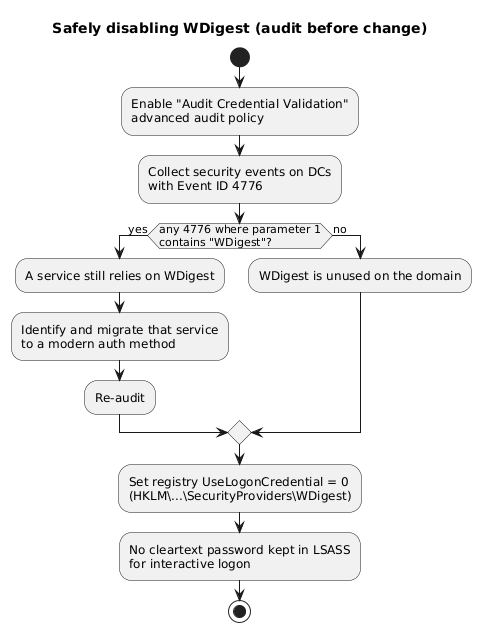
Audit before you disable. Turning off a provider that something still depends on causes outages, so confirm WDigest is unused first:
- Enable the “Audit Credential Validation” advanced audit policy.
- Create a collection rule on the Domain Controllers looking for security events with Event ID 4776 where the first parameter contains
WDigest.
If nothing matches, WDigest is unused and can be disabled safely; if something matches, migrate that service before changing the registry. The workflow below captures this audit-then-disable discipline.
LSA Protection (RunAsPPL)
LSASS holds the secrets, so the next step is to make the process itself harder to read. LSA Protection runs LSASS as a Protected Process, which prevents non-protected processes from debugging it or reading its memory. (Protected Process technology was originally built to stop key extraction for DRM and was repurposed here.)
- Available on Windows 8.1, 10, Server 2012 R2 and 2016.
- Enabled by setting
RunAsPPL = 1underHKLM\SYSTEM\CurrentControlSet\Control\Lsa.
Limitation: it is bypassable. Protected Process is a user-mode boundary. An attacker who can load a signed kernel driver can reach LSASS through raw kernel memory and disable RunAsPPL. Mimikatz ships exactly such a driver, mimidrv.sys, to defeat LSA Protection. The defensive value is therefore not absolute: it raises the bar to “must load a kernel driver”, and loading a driver is a noisy event that can be detected by monitoring for it. LSA Protection buys detection and friction, not an impassable wall.
Credential Guard
Credential Guard is the stronger answer to the same problem. Instead of merely protecting the LSASS process, it moves the secrets out of the normal operating system entirely using Virtualization-Based Security (VBS).
The mechanism: the hypervisor creates an isolated, higher-trust environment (a separate virtual trust level) and runs an isolated LSA (often called LSAIso) there. The ordinary LSA in the normal world becomes only an interface that asks the isolated component to use a secret on its behalf. NT hashes and Kerberos keys live inside the isolated world and never cross back into normal-world memory.
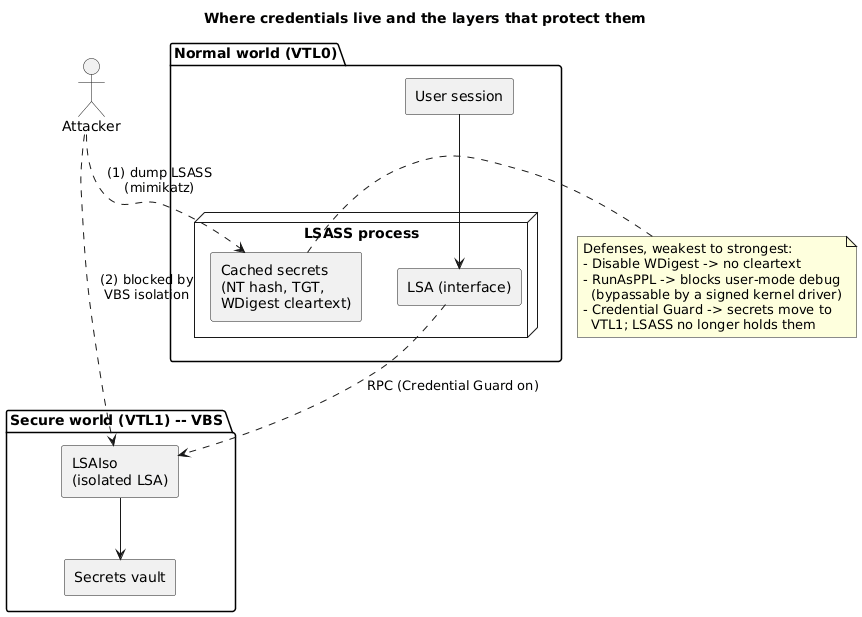
The consequence for an attacker is concrete: dumping LSASS in the normal world yields no reusable hash or ticket, because the usable secret is no longer there. The figure below shows the request path.
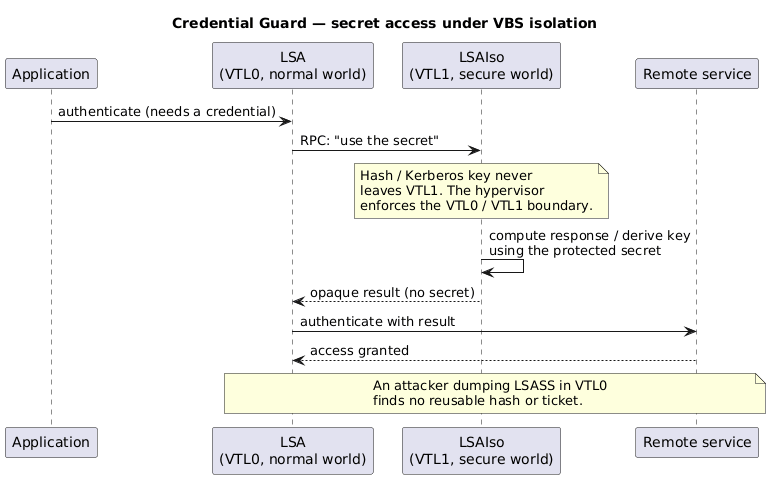
Credential Guard is enabled through Group Policy (under Device Guard). Its cost is real:
- a measurable performance impact from the virtualization layer;
- substantial requirements: UEFI firmware v2.3.1+, CPU virtualization extensions, a TPM (1.2 or 2.0), and a Windows Enterprise / Education edition.
It also protects only what it covers: it does not retrofit protection onto credentials cached before it was enabled, and it does not stop a keylogger capturing a password as the user types it.
Privileged account discipline
Technical controls are undercut by sloppy account use. Domain administrator accounts should be reserved for the few tasks that genuinely require them on a Domain Controller:
- promoting a member server to a Domain Controller,
- modifying the default and Domain Controller GPOs,
- logging on to a Domain Controller,
- changing forest or trust configuration,
- extending the AD schema,
- creating or deleting privileged accounts.
Everything else should use a less privileged account. The reasoning ties back to logon types: every time a domain-admin credential is used for an interactive logon on an ordinary workstation, it risks being cached in that machine’s LSASS, where a local compromise can harvest it. Limiting where and how privileged accounts are used limits where their credentials can be stolen.
Protected Users group
The Protected Users group (introduced with Windows Server 2012 R2) enforces this discipline for its members by denying legacy, weak protocols and features. Membership comes with strict limitations, which are the point of the group rather than side effects.
- Kerberos only. Members cannot authenticate with NTLM, Digest Authentication, or CredSSP. Single sign-on is disabled, so passwords are not cached.
- Strong Kerberos ciphers only. Kerberos will not use the weaker DES or RC4; the domain must be configured for AES.
- No delegation. The account cannot be delegated via Kerberos, constrained or unconstrained. Existing setups that relied on delegation may break.
- Short TGT lifetime. The default Ticket Granting Ticket lifetime is 4 hours (configurable via Authentication Policy in the AD Administrative Center), after which the user must re-authenticate.
These restrictions cut off exactly the mechanisms credential-theft attacks abuse (NTLM hashes, RC4 Kerberoasting, delegation), which is why the group is a strong control for privileged accounts.
It is not complete. Protected Users cannot defend against everything: prior Windows versions do not enforce the protections, the restrictions can break legitimate legacy connections, and nothing here stops a keylogger from capturing a credential at the keyboard. It reduces the attack surface of privileged accounts; it does not eliminate it.
Conclusion
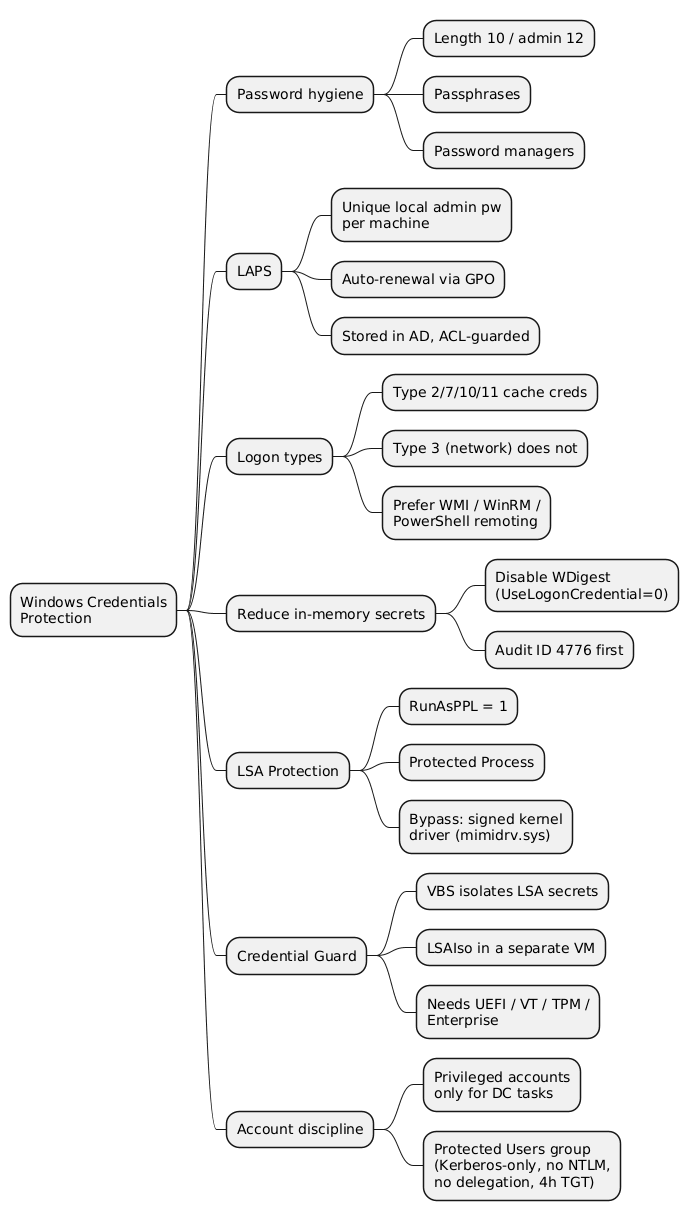
Windows credential protection is defense in depth around one asset: the secret. Policy makes the secret strong (length, passphrases, managers); LAPS makes local admin secrets unique and disposable so one theft does not cascade; logon-type awareness and management tooling keep secrets out of remote machines’ memory in the first place; disabling WDigest removes a cleartext copy; LSA Protection raises the cost of reading LSASS (though a signed kernel driver bypasses it); Credential Guard moves the secrets into a VBS-isolated world where a normal-world memory dump finds nothing reusable; and account discipline plus the Protected Users group limit where and how privileged credentials can be exposed.
Two boundaries are worth keeping in view. First, each layer has a defeat: RunAsPPL falls to a kernel driver, Credential Guard does not cover pre-existing caches or keyloggers, and Protected Users is unenforced on old systems. Second, these are protections for credentials that already exist on the host; they pair with the front-door controls (smartcards, Windows Hello, FIDO2) from the companion article, and with token-theft defenses, to cover the whole authentication lifecycle rather than a single point in it.
Frequently Asked Questions
Q: What problem does LAPS solve, and how?
LAPS solves the shared-local-administrator-password problem. When every machine uses the same local admin password, recovering it from one compromised host lets an attacker pass the hash to every other host. LAPS gives each domain member a unique local admin password, rotates it automatically through Group Policy, and stores it in Active Directory behind an ACL so only eligible principals can read or reset it. Compromising one machine then yields a password that works nowhere else.
Q: Why does the logon type determine whether credentials can be stolen from a machine?
Because only some logon types cache reusable credentials in LSASS. Interactive, unlock, remote-interactive (RDP) and cached-interactive logons (types 2, 7, 10, 11) leave secrets in memory; a network logon (type 3) does not. An attacker who compromises a host can only harvest what is cached there, so administering remote machines with network-logon tools (WMI, PowerShell remoting, Windows Admin Center) instead of interactive RDP means the administrator’s credentials are never deposited on the target in the first place.
Q: What is WDigest, and why disable it?
WDigest is a legacy provider that offers single sign-on for HTTP digest authentication. To produce digest responses it keeps the user’s cleartext password in LSASS memory, which is an obvious theft target. It is rarely needed, so Microsoft added the UseLogonCredential registry value to disable it. Before disabling it you should audit (enable “Audit Credential Validation” and watch for Event ID 4776 entries mentioning WDigest) to confirm nothing on the domain still depends on it, because turning off a provider in use causes authentication failures.
Q: How does Credential Guard differ from LSA Protection, and why is it stronger?
LSA Protection (RunAsPPL) keeps LSASS in the normal operating system but marks it a Protected Process, blocking user-mode debugging and memory reads. It is a user-mode boundary, so a signed kernel driver (such as Mimikatz’s mimidrv.sys) can bypass it by reaching kernel memory and disabling the flag. Credential Guard instead uses Virtualization-Based Security to move the secrets into a hypervisor-isolated world; the normal-world LSA only holds an interface, and the hashes and Kerberos keys never return to normal-world memory. Dumping LSASS therefore yields nothing reusable, which is why it is the stronger control, at the cost of performance and hardware requirements (UEFI, virtualization extensions, TPM, Enterprise/Education edition).
Q: Combining several controls, an administrator enables RunAsPPL and Credential Guard and adds privileged accounts to Protected Users. Which credential-theft techniques are mitigated, and which still work?
Mitigated: dumping LSASS to recover hashes and Kerberos keys is defeated by Credential Guard (the secrets are not in normal-world memory), and RunAsPPL adds detection and friction even where Credential Guard is absent. Protected Users blocks NTLM, Digest and CredSSP for its members, disables SSO caching, forbids weak DES/RC4 Kerberos and delegation, and shortens the TGT lifetime, which cuts off pass-the-hash, RC4 Kerberoasting and delegation abuse for those accounts. Still working: a keylogger capturing the password as it is typed is unaffected by any of these; pre-existing cached credentials from before Credential Guard was enabled are not retroactively protected; older Windows versions do not enforce Protected Users; and a kernel-level attacker who can load a driver can still attack RunAsPPL where Credential Guard is not present. The controls reduce the attack surface substantially but do not make a privileged credential unstealable.
Q: Why are password policy and account discipline part of “credentials protection” alongside memory-hardening features?
Because credential protection is defense in depth, not a single feature. Memory and process hardening (WDigest, RunAsPPL, Credential Guard) protect a secret that already exists on a host, but they do nothing about a weak secret that is guessed offline, a reused secret exposed by another breach, or a privileged credential needlessly deposited on an ordinary workstation. Strong passphrases, password managers, LAPS, restricting privileged-account use to Domain Controller tasks, and the Protected Users group address those gaps. Layered together, policy plus discipline plus memory hardening cover more of the lifecycle than any one of them alone.
References
- Microsoft Learn - Windows LAPS overview
- Microsoft Learn - Configure added LSA protection (RunAsPPL)
- Microsoft Learn - How Credential Guard works
- Microsoft Learn - Protected Users security group
- Microsoft - Mitigating Pass-the-Hash and credential theft (WDigest UseLogonCredential)
- Microsoft - The evolution of Windows authentication (NTLM deprecation)
- SOS 2021 - 06 Windows credentials protection, JMB, HEIG-VD, May 2021 (source lecture)
- Claude Code
Related articles
You might also enjoy