Windows Advanced Authentication - Smartcards, Virtual Smartcards and Hello for Business
Passwords remain the weakest link in most enterprise authentication systems. Windows offers several mechanisms that replace or strengthen the shared secret with asymmetric keys held in tamper-resistant hardware: physical smartcards, TPM-backed virtual smartcards, and Windows Hello for Business. This article explains how each works, follows the Kerberos PKINIT flow that ties them to a domain logon, and shows why some classic attack surfaces survive regardless of the credential type.
Source and currency note. This article is based on the lecture SOS 2021 - 07 Windows Advanced Authentication (JMB, HEIG-VD, May 2021). The material targets Windows 10 and the domain model of that period. The core mechanics (asymmetric keys, the TPM, Kerberos PKINIT) remain accurate, but the surrounding ecosystem has moved on: FIDO2 security keys and passkeys are now first-class, Windows Hello for Business supports a cloud Kerberos trust model, and Microsoft has begun deprecating NTLM. Sections that reflect post-2021 changes are flagged explicitly.
This article has been made with the help of Claude Code and several custom skills
Why passwords fail
When users do not delegate password generation and storage to a password manager, the secrets they choose are predictable. Three failure modes dominate.
- Guessable structure. Manually chosen passwords follow well-known patterns. A password such as
Yverdon2021$satisfies a typical complexity policy (upper case, digits, a symbol) while being trivially derived from a place name, the current year and a terminal symbol. Cracking dictionaries and mask attacks model exactly these patterns. - Reuse. The same password is used across multiple applications and sites. A breach of one low-value service then compromises higher-value accounts through credential stuffing.
- Phishing. Because the user knows the secret, the user can be tricked into typing it into an attacker-controlled page. Knowledge-based authentication is fundamentally phishable: any factor the human can recite, the human can be socially engineered into disclosing.
The mechanisms below attack these three properties directly. The central idea is to move the secret into hardware so that the user no longer knows it and therefore cannot reveal it.
Smartcards
A smartcard replaces the shared password with an asymmetric key pair. The private key is generated on the card and is marked non-exportable, so it never leaves the device. Authentication is proved by having the card sign a challenge, never by transmitting the secret.
Two properties follow directly:
- The user does not know the secret. There is nothing to phish. An attacker who builds a convincing fake logon page gains nothing, because the credential is a signature produced by hardware, not a string the user can type.
- The private key is protected by a PIN. Authentication becomes two-factor: something you have (the card) and something you know (the PIN). The PIN unlocks the card locally and is never sent to the domain controller.
Hardware
A smartcard is a small embedded system: a processing unit with its own RAM, ROM and EEPROM. It performs two jobs.
- It stores secret material and protects it against unauthorised access, including physical readout.
- It performs cryptographic operations on board, using the secret material in place. The host sends a challenge; the card returns a signature. The host never sees the private key.
The same isolation principle underlies virtual smartcards and Windows Hello, so it is worth stating as an architecture. The figure below shows the boundary that the private key never crosses.
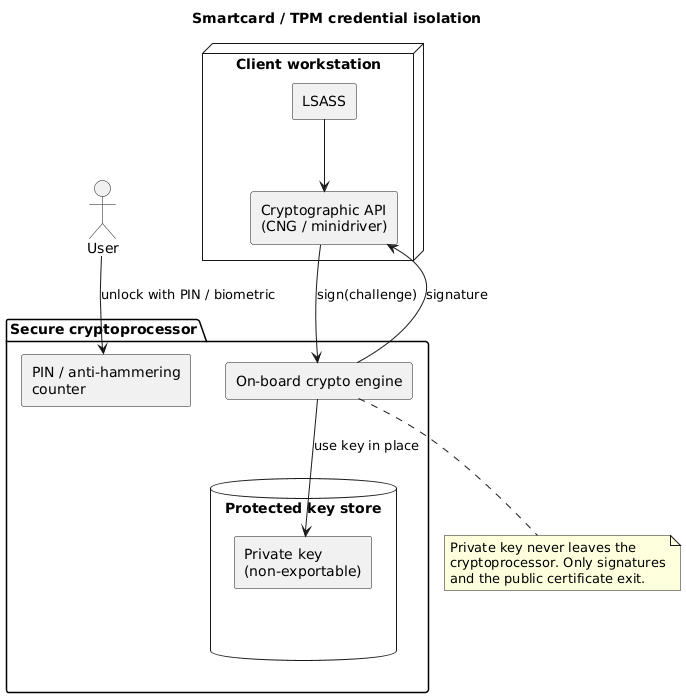
The Local Security Authority Subsystem Service (LSASS) drives authentication on the client but delegates the actual signing to the cryptoprocessor through the Cryptography API. Only the resulting signature and the public certificate ever leave the secure boundary.
Kerberos and PKINIT
Smartcards target Kerberos, the default domain authentication protocol. Kerberos as defined in RFC 4120 was not originally designed for asymmetric keys: the standard pre-authentication step proves knowledge of a symmetric key derived from the user’s password.
To support public-key credentials, a pre-authentication extension named PKINIT was standardised in RFC 4556. Microsoft extended it further for its own ecosystem in the [MS-PKCA] specification. The principle is a substitution: the password-derived shared secret used in pre-authentication is replaced by the smartcard’s asymmetric key pair. The user signs the pre-authentication data with the private key on the card; the Key Distribution Center (KDC) validates the certificate against the domain’s trusted PKI and issues a Ticket Granting Ticket (TGT) in return.
The sequence below traces a smartcard logon from PIN entry to a usable service ticket.
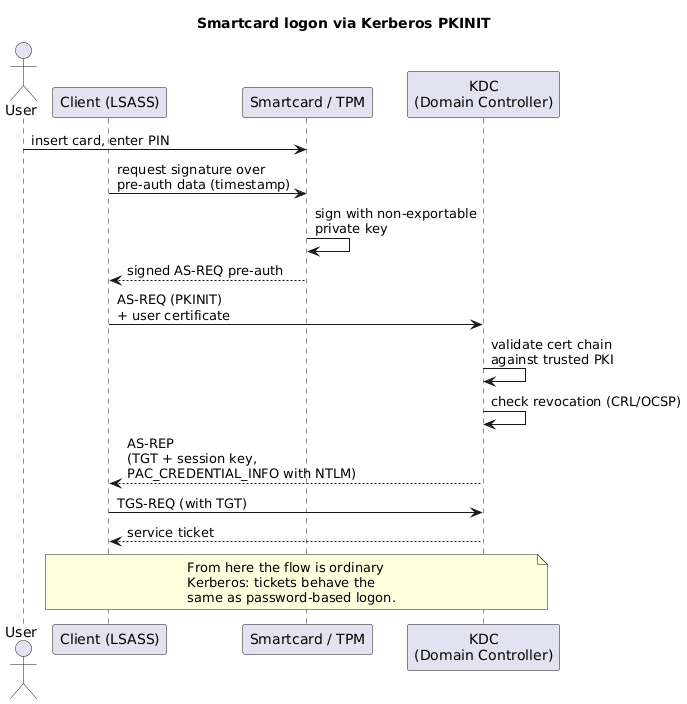
The important observation is that PKINIT only changes pre-authentication. Once the TGT is issued, the rest of the exchange is ordinary Kerberos: the same tickets, the same session keys, the same downstream behaviour as a password logon.
NTLM and the PAC
Smartcards should remove support for NTLM, and at first glance they do. NTLM authentication requires the NT hash of the user’s password. With a smartcard, LSASS never has access to a password and therefore cannot compute that hash. In principle this protects against pass-the-hash attacks, since there is no password-derived hash on the client to steal.
In practice, compatibility wins. For applications that still depend on NTLM, the domain controller returns a usable NT hash to the client inside the PAC_CREDENTIAL_INFO structure of the PKINIT pre-authentication response. The Privilege Attribute Certificate (PAC) is the Microsoft extension that carries authorization data inside Kerberos tickets; here it also smuggles an NTLM credential so that NTLM-only services keep working. The consequence is blunt: a smartcard does not, by itself, eliminate the NTLM hash from the authenticated session.
Drawbacks
Physical smartcards are operationally heavy:
- Lost cards. Users lose cards, so the organisation must be able to reissue them quickly.
- Lockout. A card typically locks after three failed PIN attempts, generating help-desk load.
- Certificates and PKI. Logon certificates require a Public Key Infrastructure to issue, renew and revoke them.
- Readers and drivers. Cards need readers, which in turn may need USB ports and device drivers.
- Software compatibility. Third-party software that still expects a password reduces the set of compatible applications.
These costs are the main reason virtual smartcards exist.
Virtual smartcards
Windows 10 added support for virtual smartcards, which reproduce the security properties of a physical card using the Trusted Platform Module (TPM) soldered to the machine instead of a removable card and reader.
A TPM-backed virtual smartcard offers the same three guarantees as the physical device:
- Non-exportability. Private keys are generated and sealed inside the TPM and cannot be extracted.
- Isolated cryptography. Signing happens inside the TPM, isolated from the host operating system.
- Anti-hammering. The TPM rate-limits and eventually blocks repeated PIN guesses, the hardware equivalent of the card’s three-attempt lockout.
Conceptually, a virtual smartcard behaves like a physical card that is always inserted. This makes the desktop itself a possession factor: authentication is bound to that specific machine’s TPM, so a stolen PIN is useless without the physical device.
Deployment
Deploying a TPM virtual smartcard is a short, repeatable procedure:
- Install and configure a Certificate Authority.
- Create a certificate template for smartcard logon.
- Publish (allow) that template on the CA so it can be enrolled.
- Create the TPM virtual smartcard on the device (historically with
tpmvscmgr create). - Enroll the logon certificate onto the virtual smartcard.
The activity diagram below shows the flow, including the hard dependency on a provisioned TPM.
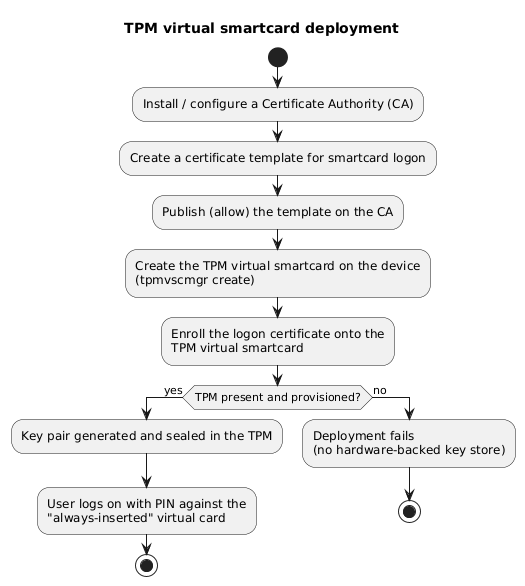
The deployment still requires PKI, which is the one cost that virtual smartcards do not remove. What they do remove is the physical card, the reader and the associated logistics.
Windows Hello for Business
Windows Hello for Business extends the virtual smartcard idea into the credential that most enterprise users now see at the lock screen. The asymmetric keys are again used in the background and stored on the TPM, so the cryptographic model is the same as a virtual smartcard.
The user-facing difference is the unlock factor. In addition to a PIN, Windows Hello for Business supports a biometric second factor:
- fingerprint,
- face recognition,
- iris.
The biometric never leaves the device and is only a local gesture to release the TPM-held key; the credential presented to the domain is still an asymmetric signature, not the biometric template. This keeps the anti-phishing property intact while improving usability.
Post-2021 update. Since the lecture, Windows Hello for Business has gained a cloud Kerberos trust deployment model that uses Microsoft Entra ID (formerly Azure AD) to issue Kerberos TGTs, simplifying the on-premises certificate requirements. In parallel, FIDO2 security keys and passkeys have become a fully supported, phishing-resistant alternative that does not require enterprise PKI at all. Both are now common in environments that the 2021 material predates.
What these mechanisms do not fix
The techniques above genuinely solve the two problems they target: they remove weak, guessable passwords and they remove the phishing of a known secret, because the user no longer holds one. They do not, however, change what happens after authentication.
- NTLM still applies. As described above, the domain controller can hand back an NTLM credential in
PAC_CREDENTIAL_INFOfor compatibility. Services and lateral-movement techniques that rely on NTLM remain reachable. - Kerberos tickets are exposed as before. PKINIT only replaces pre-authentication. The TGT and service tickets issued afterwards are identical to those of a password logon, so ticket-theft techniques (pass-the-ticket, overpass-the-hash, Golden and Silver Tickets) are unaffected by the choice of credential.
Strengthening the front door of authentication does not secure the tokens it produces. Defending Kerberos tickets and retiring NTLM are separate problems. In the years after the lecture, Microsoft moved to deprecate NTLM and to promote phishing-resistant, ticket-aware designs rather than treating smartcards as a complete answer.
Conclusion
Smartcards, virtual smartcards and Windows Hello for Business share one design move: the authentication secret becomes a non-exportable private key held in tamper-resistant hardware, unlocked locally by a PIN or biometric and never transmitted. That move removes guessable passwords and the phishing of known secrets, and Kerberos PKINIT is the standardised plumbing that lets a domain accept these asymmetric credentials. The progression from physical card to TPM virtual smartcard to Windows Hello for Business is mostly a reduction in operational cost (no reader, no removable card) while keeping the same cryptographic guarantees, though all of them still depend on PKI.
The boundary of these mechanisms is equally clear. They protect the act of authenticating, not the tokens it produces. NTLM credentials can still appear in the PAC for compatibility, and Kerberos tickets remain exactly as exposed as before. Read in 2026, this 2021 material describes a front-door control whose residual gaps (NTLM and ticket theft) are what later work on NTLM deprecation, FIDO2 and passkeys set out to close.
Frequently Asked Questions
Q: Why is a smartcard credential resistant to phishing while a password is not?
A password is knowledge: the user can recite it, so the user can be tricked into typing it into a fake page. A smartcard credential is a signature produced by a private key the user never sees and that never leaves the card. There is no recitable secret to disclose, so a convincing fake logon page captures nothing usable. The PIN only unlocks the card locally and is never sent to the domain controller, so capturing it remotely is of no use without the physical card.
Q: What does PKINIT change in the Kerberos exchange, and what does it leave unchanged?
PKINIT changes only the pre-authentication step. Standard Kerberos proves the user with a symmetric key derived from the password; PKINIT replaces that proof with a signature made by the smartcard’s private key, which the KDC validates against the domain PKI before issuing a TGT. Everything after the TGT is ordinary Kerberos: the same tickets, session keys and downstream behaviour. This is why ticket-theft attacks are unaffected by switching to smartcards.
Q: If a smartcard never exposes a password, how can NTLM authentication still happen?
NTLM needs the NT hash of the password, and with a smartcard the client never computes one, which appears to block NTLM. For backward compatibility, however, the domain controller returns a usable NT hash to the client inside the PAC_CREDENTIAL_INFO field of the PKINIT response. NTLM-only applications therefore keep working, but the consequence is that a smartcard logon does not remove the NTLM credential from the session.
Q: What is the relationship between a virtual smartcard and the TPM?
A virtual smartcard has no physical card or reader. Instead it uses the TPM, a cryptoprocessor soldered to the machine, to provide the same three properties a physical card offers: non-exportable keys, isolated on-chip cryptography, and anti-hammering against PIN guessing. Functionally it behaves like a card that is permanently inserted, which binds the credential to that specific device and turns the desktop into a possession factor.
Q: Combining several sections, why is deploying smartcards or virtual smartcards not sufficient to secure a Windows domain on its own?
Because these mechanisms only harden the authentication step, not the artefacts it produces. Three gaps remain. First, they still require a PKI to issue, renew and revoke certificates, which is itself a security-critical system. Second, NTLM credentials can still be delivered through the PAC for compatibility, keeping pass-the-hash-style exposure alive. Third, the Kerberos tickets issued after PKINIT are identical to those from a password logon, so pass-the-ticket and Golden/Silver Ticket attacks are unchanged. Securing a domain therefore also requires retiring NTLM and protecting tickets, which is the direction later Windows authentication work (NTLM deprecation, FIDO2, passkeys) has taken.
Q: How does Windows Hello for Business differ from a virtual smartcard?
Cryptographically they are nearly the same: both store an asymmetric key on the TPM and present a signature to the domain. The difference is the unlock factor. Windows Hello for Business adds biometric gestures (fingerprint, face, iris) alongside the PIN. The biometric stays on the device and only releases the TPM-held key; it is never sent to the domain, so the anti-phishing property is preserved while the logon experience improves.
References
- RFC 4120 - The Kerberos Network Authentication Service (V5)
- RFC 4556 - Public Key Cryptography for Initial Authentication in Kerberos (PKINIT)
- MS-PKCA - Public Key Cryptography for Initial Authentication (PKINIT) in Kerberos Protocol
- Microsoft Learn - Virtual Smart Card Overview
- Microsoft Learn - Windows Hello for Business
- Microsoft - The evolution of Windows authentication (NTLM deprecation)
- SOS 2021 - 07 Windows Advanced Authentication, JMB, HEIG-VD, May 2021 (source lecture)
- Claude Code
Related articles
You might also enjoy