Introduction to Solana Anchor — Core Concepts and Testing
Anchor is the leading framework for writing Solana programs in Rust. It eliminates boilerplate through a set of macros, enforces security checks automatically, and generates a standardized IDL that client applications can consume. This article walks through the core concepts every Anchor developer needs to understand, ending with the testing ecosystem.
This article has been made with the help of Claude Code and several custom skills
Program Structure
An Anchor program is a Rust crate annotated with four macros that together define the full on-chain interface.
use anchor_lang::prelude::*;

declare_id!("11111111111111111111111111111111");

#[program]
mod hello_anchor {
    use super::*;

    pub fn initialize(ctx: Context<Initialize>, data: u64) -> Result<()> {
        ctx.accounts.new_account.data = data;
        msg!("Changed data to: {}!", data);
        Ok(())
    }
}

#[derive(Accounts)]
pub struct Initialize<'info> {
    #[account(init, payer = signer, space = 8 + 8)]
    pub new_account: Account<'info, NewAccount>,
    #[account(mut)]
    pub signer: Signer<'info>,
    pub system_program: Program<'info, System>,
}

#[account]
pub struct NewAccount {
    data: u64,
}
declare_id!
Declares the on-chain address of the program. The value must match the public key of the keypair generated at /target/deploy/<program_name>.json. After cloning a repository, always run:
anchor keys sync
This re-aligns declare_id! with the locally-generated keypair, preventing silent mismatches.
#[program]
Marks the module containing all instruction handlers. Every pub fn inside this module becomes an on-chain instruction callable by clients. Each handler signature follows the pattern:
pub fn instruction_name(ctx: Context<AccountsStruct>, arg1: T, ...) -> Result<()>
The Context<T> type exposes:
ctx.accounts— the validated and deserialized accountsctx.program_id— the program’s public keyctx.bumps— bump seeds for any PDA accounts in the structctx.remaining_accounts— extra accounts not declared in the struct
#[derive(Accounts)]
Applied to a struct to specify all accounts an instruction requires. Anchor automatically validates each account against the declared constraints before the instruction logic runs.
Account types used in field declarations include:
Account<'info, T>— a program-owned account deserializing to typeTSigner<'info>— an account that must sign the transactionSystemAccount<'info>— an account owned by the System ProgramProgram<'info, T>— a program account (e.g.Program<'info, System>)
#[account]
Defines the data layout of a custom account type. This macro:
- Assigns program ownership — the account’s owner is set to the current program at initialization.
- Sets an 8-byte discriminator — prepended to account data, computed as the first 8 bytes of
sha256("account:<AccountName>"). Used to validate account type at deserialization. - Handles serialization/deserialization — account data is automatically encoded and decoded via Borsh.
Because of the discriminator, space must always be 8 + <sum of field sizes>:
#[account(init, payer = signer, space = 8 + 8)] // 8 discriminator + 8 for u64
pub new_account: Account<'info, NewAccount>,
The IDL File
Running anchor build produces /target/idl/<program-name>.json — an Interface Description Language file. It describes every instruction (name, accounts, parameters) and every account type (name, fields). The Anchor TypeScript/JavaScript client reads this file to:
- Auto-resolve account addresses (especially PDAs)
- Encode instruction data correctly
- Decode account data returned from the chain
Discriminators are embedded in the IDL as of Anchor v0.30. The instruction discriminator is:
sha256("global:<instruction_name>")[0..8]
Program Derived Addresses (PDAs)
PDAs are addresses derived deterministically from a set of seeds and a program ID. They fall off the Ed25519 curve, meaning no private key exists for them — only the program whose ID was used to derive the PDA can sign on their behalf, by providing the original seeds via invoke_signed.
Defining a PDA in an Accounts struct
#[derive(Accounts)]
pub struct MyInstruction<'info> {
    pub signer: Signer<'info>,
    #[account(
        seeds = [b"hello_world", signer.key().as_ref()],
        bump,
    )]
    pub pda_account: SystemAccount<'info>,
}
The seeds and bump constraints are always used together. Anchor derives the PDA on-chain during account validation and checks that the provided address matches. The optional seeds::program constraint overrides the program ID used for derivation, which is needed when validating a PDA owned by a different program.
Because PDA seeds are encoded in the IDL, the Anchor TypeScript client can auto-resolve the address without manual computation in most cases. For explicit client-side derivation:
const [pda] = PublicKey.findProgramAddressSync(
  [Buffer.from("hello_world"), wallet.publicKey.toBuffer()],
  program.programId,
);
PDA as storage account
To initialize a PDA account that stores data:
#[account(
    init,
    payer = signer,
    space = 8 + 32,
    seeds = [b"vault", signer.key().as_ref()],
    bump,
)]
pub vault: Account<'info, VaultData>,
Cross-Program Invocations (CPIs)
A CPI allows one program to invoke an instruction on another program. It mirrors the same three-element pattern as any instruction: program ID, accounts, instruction data.
Basic CPI
use anchor_lang::system_program::{transfer, Transfer};

pub fn sol_transfer(ctx: Context<SolTransfer>, amount: u64) -> Result<()> {
    let cpi_context = CpiContext::new(
        ctx.accounts.system_program.to_account_info(),
        Transfer {
            from: ctx.accounts.sender.to_account_info(),
            to: ctx.accounts.recipient.to_account_info(),
        },
    );
    transfer(cpi_context, amount)?;
    Ok(())
}

#[derive(Accounts)]
pub struct SolTransfer<'info> {
    #[account(mut)]
    sender: Signer<'info>,
    #[account(mut)]
    recipient: SystemAccount<'info>,
    system_program: Program<'info, System>,
}
CpiContext::new takes the target program’s AccountInfo and a struct implementing the Accounts trait for that instruction.
CPI with PDA Signer
When the sending account is a PDA, the program must explicitly authorize it by providing the seeds used to derive it:
pub fn sol_transfer_from_pda(ctx: Context<SolTransferPda>, amount: u64) -> Result<()> {
    let bump = ctx.bumps.pda_account;
    let signer_seeds: &[&[&[u8]]] = &[&[
        b"pda",
        ctx.accounts.recipient.key().as_ref(),
        &[bump],
    ]];

    let cpi_context = CpiContext::new(
        ctx.accounts.system_program.to_account_info(),
        Transfer {
            from: ctx.accounts.pda_account.to_account_info(),
            to: ctx.accounts.recipient.to_account_info(),
        },
    ).with_signer(signer_seeds);

    transfer(cpi_context, amount)?;
    Ok(())
}
The bump is retrieved via ctx.bumps.<field_name> — Anchor stores it during constraint validation so it does not need to be recalculated or passed as an argument.
Custom Errors
All instruction handlers return Anchor’s Result<()> type. Custom errors are defined with the #[error_code] attribute, which assigns numeric codes starting at 6000:
#[error_code]
pub enum MyError {
    #[msg("Value must be below 100")]
    ValueTooLarge,
    #[msg("Value must be above 0")]
    ValueTooSmall,
}
Throwing errors
Use err! for explicit returns:
if data > 100 {
    return err!(MyError::ValueTooLarge);
}
Use require! macros for concise guard clauses:
require!(data <= 100, MyError::ValueTooLarge);
require!(data > 0,    MyError::ValueTooSmall);
Available require! variants:
| Macro | Condition enforced |
|---|---|
require!(cond, err) |
cond is true |
require_eq!(a, b, err) |
a == b (non-pubkey) |
require_neq!(a, b, err) |
a != b (non-pubkey) |
require_keys_eq!(a, b, err) |
a == b (pubkeys) |
require_keys_neq!(a, b, err) |
a != b (pubkeys) |
require_gt!(a, b, err) |
a > b |
require_gte!(a, b, err) |
a >= b |
The TypeScript client receives a structured error response including the error code, message, file, and line number — which makes debugging straightforward.
Testing
Anchor programs can be tested at several levels of fidelity. The right choice depends on the trade-off between speed and closeness to a live validator.
| Framework | Language | Speed | When to use |
|---|---|---|---|
| LiteSVM | Rust, TS/JS, Python | Very fast | Most unit and integration tests |
| Mollusk | Rust only | Fastest | Single-instruction unit tests, CU benchmarking |
solana-test-validator |
Any | Slow | Tests requiring real RPC behaviour |
LiteSVM
LiteSVM runs an in-process Solana VM optimized for program testing. It is significantly faster than solana-program-test or solana-test-validator and requires no external process.
Installation:
[dev-dependencies]
litesvm = "*"
Basic pattern:
use litesvm::LiteSVM;
use solana_keypair::Keypair;
use solana_signer::Signer;

let mut svm = LiteSVM::new();
let payer = Keypair::new();
svm.airdrop(&payer.pubkey(), 1_000_000_000).unwrap();

// Deploy the compiled program
svm.add_program_from_file(program_id, "target/deploy/my_program.so").unwrap();

let blockhash = svm.latest_blockhash();
// Build and send a transaction...
let meta = svm.send_transaction(tx).unwrap();
assert_eq!(meta.logs[1], "Program log: expected message");
Clock manipulation (time travel):
Many programs gate behaviour behind time. LiteSVM allows overriding the Clock sysvar directly:
use solana_clock::Clock;

let mut clock = svm.get_sysvar::<Clock>();
clock.unix_timestamp = 1_700_000_000; // set to a specific timestamp
svm.set_sysvar::<Clock>(&clock);

// Jump to a future slot
svm.warp_to_slot(500);
Writing arbitrary accounts:
LiteSVM allows injecting account state that would be impossible to create through normal program execution — for example, giving an account a large USDC balance without holding the mint authority:
use litesvm::LiteSVM;
use solana_account::Account;

svm.set_account(
    associated_token_address,
    Account {
        lamports: 1_000_000_000,
        data: serialized_token_account_bytes.to_vec(),
        owner: spl_token::ID,
        executable: false,
        rent_epoch: 0,
    },
).unwrap();
Simulate before executing:
let sim_res = svm.simulate_transaction(tx.clone()).unwrap();
let meta = svm.send_transaction(tx).unwrap();
assert_eq!(sim_res.meta, meta);
Pulling programs from mainnet/devnet:
solana program dump <ADDRESS> target/deploy/my_program.so
Use solana account <ADDRESS> to dump account state to a file for use in tests.
Mollusk
Mollusk is a minimal test harness that provisions the SVM execution pipeline directly, without an AccountsDB, Bank, or any Agave runtime component. It is the fastest available option for testing a single instruction in isolation.
The trade-off: all accounts must be provided explicitly since there is no backing store to load them from.
Installation:
[dev-dependencies]
mollusk-svm = "*"
Single instruction with validation:
use mollusk_svm::{Mollusk, result::Check};
use solana_sdk::system_instruction;

let mollusk = Mollusk::new(&program_id, "my_program");

mollusk.process_and_validate_instruction(
    &instruction,
    &accounts, // &[(Pubkey, Account)]
    &[
        Check::success(),
        Check::compute_units(450),
        Check::account(&recipient_key)
            .lamports(expected_lamports)
            .build(),
    ],
);
Instruction chains:
mollusk.process_and_validate_instruction_chain(
    &[
        (&ix_one, &[Check::success()]),
        (&ix_two, &[Check::success(), Check::account(&key).lamports(100).build()]),
    ],
    &initial_accounts,
);
Note: Mollusk instruction chains do not enforce transaction-level constraints (size, loaded account limits). They are for testing program logic only.
Compute unit benchmarking:
Mollusk provides a dedicated bencher that tracks CU usage over time and outputs a markdown report with deltas:
use mollusk_svm_bencher::MolluskComputeUnitBencher;

MolluskComputeUnitBencher::new(mollusk)
    .bench(("initialize", &ix_init, &accounts_init))
    .bench(("update",     &ix_update, &accounts_update))
    .must_pass(true)
    .out_dir("../target/benches")
    .execute();
Cargo.toml entry:
[[bench]]
name = "compute_units"
harness = false
Output example:
| Name       | CUs   | Delta  |
| initialize | 1,204 | --     |
| update     |   579 | -625   |
This makes it practical to track the compute impact of every change to the program.
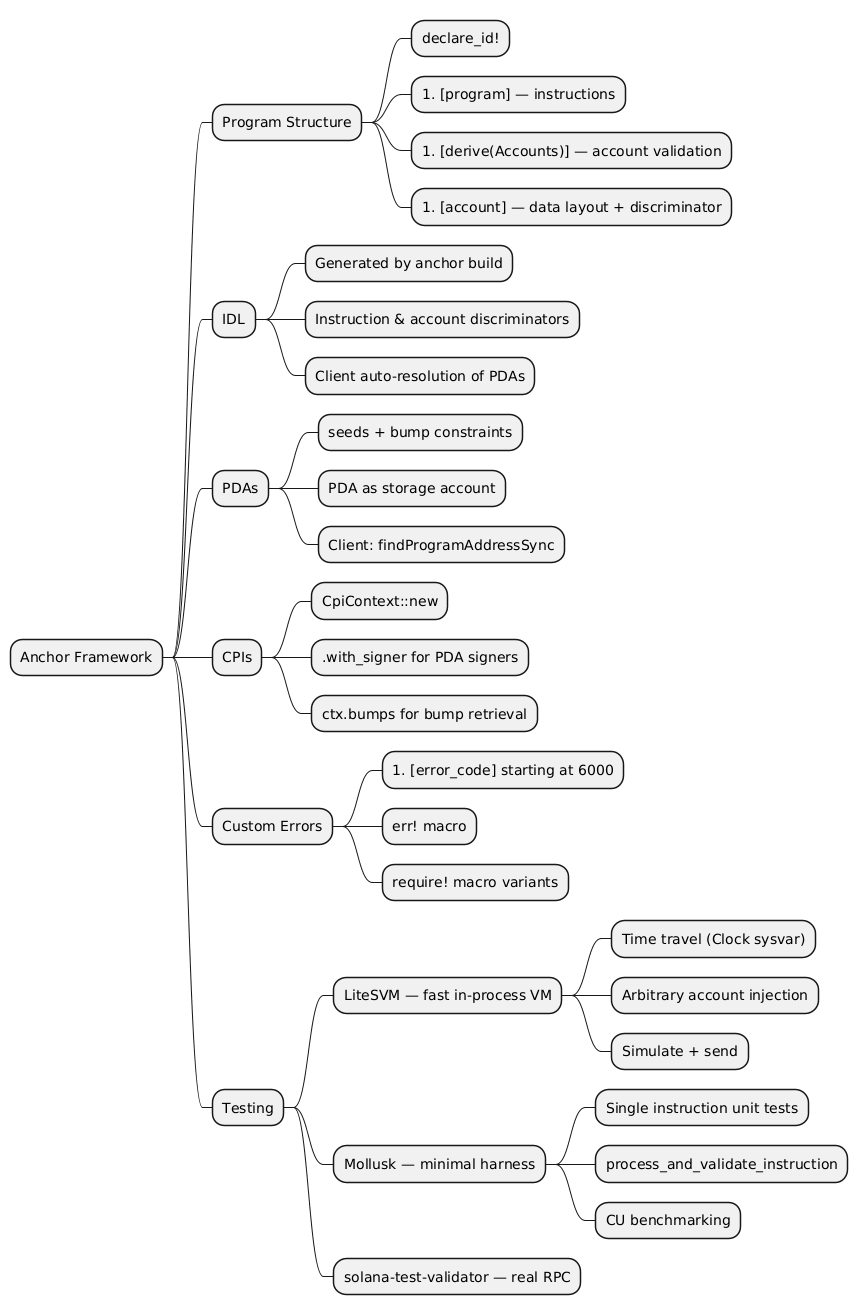
Summary
Reference
- Claude Code
- Anchor Documentation
- LiteSVM GitHub
- Mollusk GitHub
- Anchor Program Structure
- Anchor PDAs
- Anchor CPIs
- Anchor Custom Errors
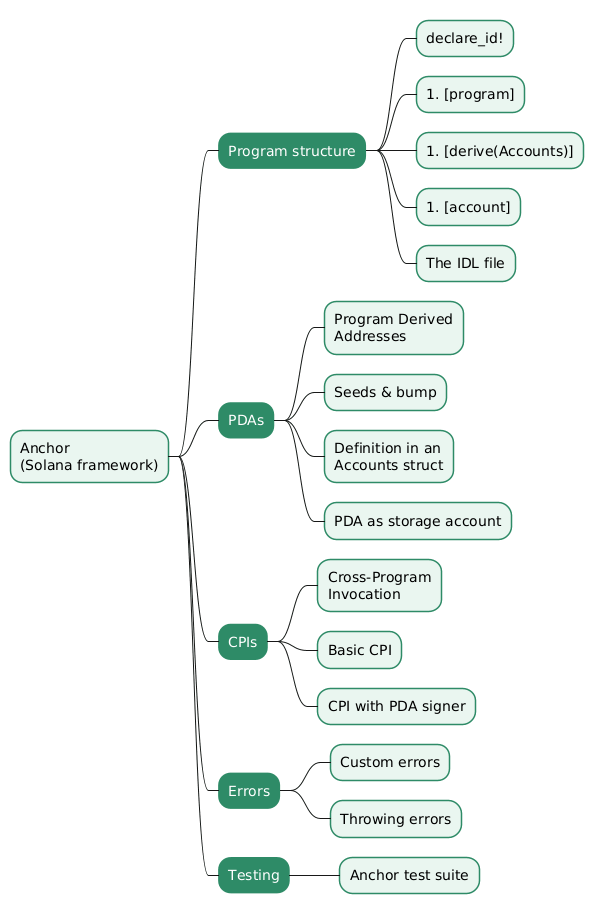
Mindmap
The mindmap below summarizes the article.
Related articles
- Solana Core Concept
- Rust for Solana - Basic knowledge
- Solana Programs - Basic Security with Anchor
- Fuzzing Solana Programs with Trident
- Bio’s Voter Stake Registry - Vote-Escrow Governance on Solana with spl-governance
You might also enjoy