ISO 20022 for Securities Management — The semt Message Set
If camt is how a bank reports your cash, semt is how a custodian reports your securities. The securities management business area of ISO 20022 is the reporting and querying layer of the custody world: the holdings statements, transaction statements, penalty reports, and account queries that tell an investor or its agent what it owns, what is settling, and what has moved. This article organises the area’s forty-eight messages into families, goes deep on the holdings statement that anchors it, and shows where it meets the settlement messages it reports on.
This article has been made with the help of Claude Code and several custom skills
What semt is for
semt is the securities counterpart to the cash-reporting side of camt. Where camt.053 states the balance and entries on a cash account, semt states the positions and movements on a securities account, the account a custodian or central securities depository (CSD) keeps on behalf of an owner. It is reporting and enquiry, not instruction: semt messages tell you the state of an account and answer questions about it, while the instructions that change that state live in the settlement area sese.
The account owner is typically an investor, a fund, or a broker; the account servicer is a custodian, a CSD, or a transfer agent. Between them, semt carries statements on a cycle and on demand, and lets the owner query specific positions and transactions.
The families of semt
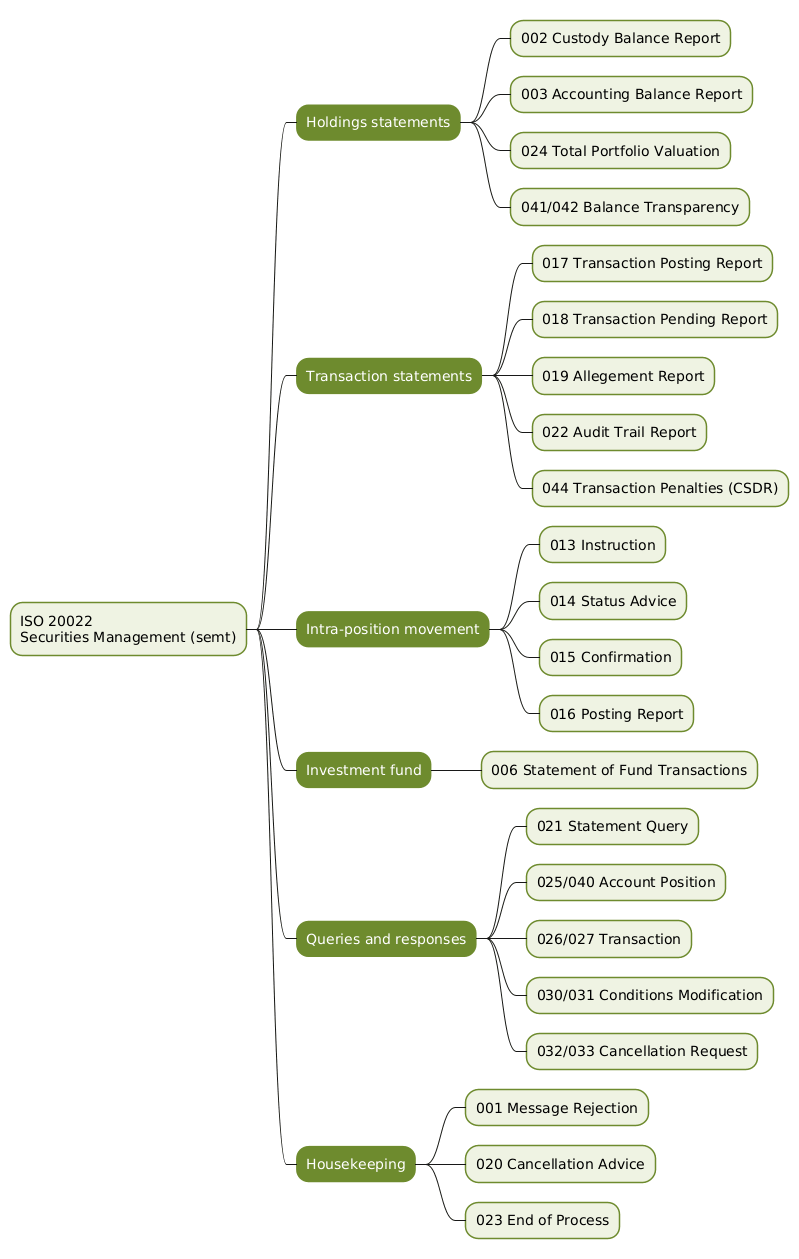
The forty-eight messages group into a handful of families around what they report or ask.
| Family | Representative messages | Purpose |
|---|---|---|
| Holdings statements | semt.002, semt.003, semt.024, semt.041 |
Report positions held on an account |
| Transaction statements | semt.017, semt.018, semt.019, semt.022, semt.044 |
Report settled, pending, alleged, and penalised transactions |
| Intra-position movement | semt.013, semt.014, semt.015, semt.016 |
Move securities between sub-positions of one account |
| Investment fund | semt.006, semt.007 |
Report investment-fund transaction statements |
| Queries and responses | semt.021, semt.025, semt.026, semt.030, semt.032 |
Ask for statements, positions, and transaction detail |
| Housekeeping | semt.001, semt.020, semt.023 |
Reject, cancel, and signal end of process |
Holdings statements
The centre of the area is the securities balance statement, which comes in two views of the same account. The semt.002 SecuritiesBalanceCustodyReport is the custody view, listing what is held; the semt.003 SecuritiesBalanceAccountingReport is the accounting view, adding valuation for book-keeping. The semt.024 TotalPortfolioValuationReport rolls a portfolio up to a valuation, and the semt.041 SecuritiesBalanceTransparencyReport (with its semt.042 status advice) serves transparency reporting.
Transaction statements
Alongside positions, semt reports movements. The semt.017 SecuritiesTransactionPostingReport lists settled transactions, the semt.018 SecuritiesTransactionPendingReport lists those still to settle, and the semt.019 SecuritiesSettlementTransactionAllegementReport lists transactions a counterparty has alleged against the account. The semt.022 audit trail report traces the history of a transaction, and the semt.044 SecuritiesTransactionPenaltiesReport reports settlement penalties, the cash charges levied on settlement fails under the CSDR settlement-discipline regime.
The other families
- Intra-position movement (
semt.013tosemt.016, and thesemt.034pending report) instructs and reports the movement of securities between sub-positions of a single account, for example blocking a holding as collateral or earmarking it, without the securities leaving the account. - Investment fund statements (
semt.006,semt.007) report the transactions on a fund position. - Queries and responses form a large group:
semt.021queries for a statement,semt.025/semt.040query and answer an account position,semt.026/semt.027a settlement transaction,semt.030/semt.031a conditions-modification request, andsemt.032/semt.033a cancellation request. They let an owner pull exactly the slice of account state it needs. - Housekeeping messages keep the traffic orderly:
semt.001rejects a message that cannot be processed,semt.020advises a cancellation, andsemt.023signals the end of a reporting process.
Anatomy of a holdings statement
The semt.002 custody balance report shows the shape the statements share.
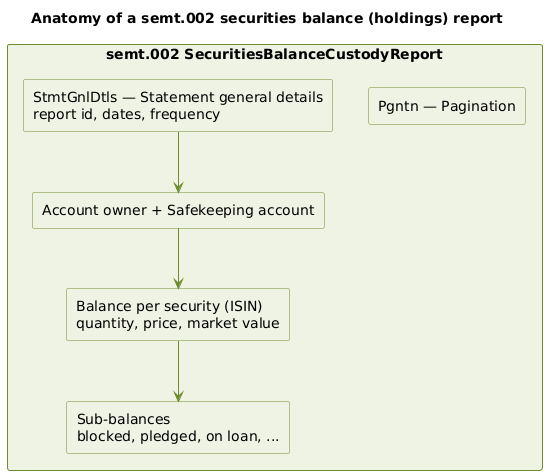
It opens with pagination (Pgntn), because a large portfolio’s statement spans many pages, and statement general details (StmtGnlDtls) giving the report identifier, the dates it covers, and its frequency. It then identifies the account owner and the safekeeping account, and lists a balance for each security, keyed by ISIN, with the quantity held, a price, and a market value. Each security’s balance can break down into sub-balances that classify part of the holding as available, blocked, pledged, on loan, or otherwise restricted. That sub-balance detail is what makes the securities statement more than a list of quantities: it tells the owner not just how much it holds but how much it can actually use.
Requesting and receiving statements
An owner receives semt statements on a reporting cycle set with its servicer, and can also pull them on demand.
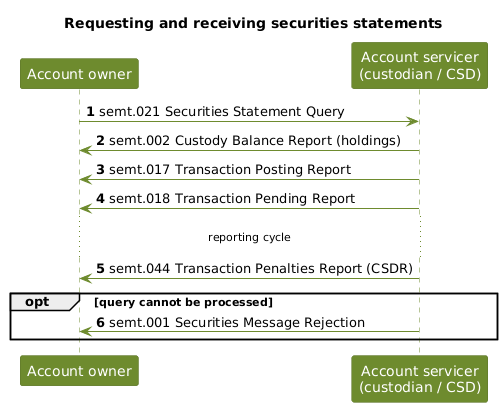
A semt.021 SecuritiesStatementQuery asks the servicer for a statement. The servicer returns the holdings in a semt.002 custody balance report, the settled movements in a semt.017 posting report, and the outstanding ones in a semt.018 pending report. Across the cycle it also sends penalty reports (semt.044) where fails have been charged. If a query cannot be processed, the servicer answers with a semt.001 SecuritiesMessageRejection rather than a statement.
Where semt meets sese
The securities management package ships with four sese messages (sese.020 to sese.023), which is a useful reminder that reporting and settlement are two halves of one picture. semt reports what has happened to an account; sese instructs what should happen. When a semt.018 pending report shows a transaction still to settle, the underlying instruction is a sese.023 settlement instruction, and a semt.019 allegement report echoes the sese.028 allegement raised in the settlement area. Reading a semt statement often means following its entries back into the settlement messages that produced them.
Conclusion
The semt business area is the custody world’s reporting layer. Its forty-eight messages state what an account holds through the balance statements, what is moving through the transaction statements, what has been charged through the penalty report, and what an owner can query on demand, while the intra-position messages move securities between sub-positions without leaving the account. Its anchor is the securities balance statement, whose sub-balance detail distinguishes holdings that are free from those that are blocked, pledged, or on loan. Read next to the settlement area sese that it reports on and the cash-reporting area camt it parallels, semt completes the account-information picture for securities.
Annex
Key Terms
| Term | Definition |
|---|---|
| semt | The ISO 20022 securities management business area: the reporting and querying layer for securities accounts, across forty-eight messages. |
| Securities account | The account a custodian or CSD keeps on behalf of an owner, recording the securities positions being reported. |
Custody balance report (semt.002) |
The holdings statement listing the securities held on an account, keyed by ISIN with quantity and value. |
Accounting balance report (semt.003) |
The accounting view of holdings, adding valuation for book-keeping. |
| Sub-balance | A classification of part of a holding as available, blocked, pledged, on loan, or otherwise restricted. |
Transaction posting report (semt.017) |
The statement of settled transactions on an account. |
Pending report (semt.018) |
The statement of transactions still to settle. |
Allegement report (semt.019) |
The report of transactions a counterparty has alleged against the account. |
Penalties report (semt.044) |
The report of cash penalties charged on settlement fails under the CSDR settlement-discipline regime. |
| Intra-position movement | The movement of securities between sub-positions of a single account, such as blocking for collateral, without the securities leaving the account. |
Frequently Asked Questions
Q: How does semt relate to camt?
They are the two account-reporting areas of ISO 20022, one for securities and one for cash. camt reports the balance and entries on a cash account; semt reports the positions and movements on a securities account. The parallel is close: camt.053 is a cash statement, and semt.002 is a securities holdings statement. A treasury or custody operation typically consumes both, camt to know its cash and semt to know its securities.
Q: What is the difference between the custody and accounting balance reports?
Both report the same account’s holdings, but from different angles. The semt.002 custody balance report is the custody view: what securities are held and in what quantity. The semt.003 accounting balance report is the accounting view: it adds the valuation needed for book-keeping. An operations team reconciling positions uses the custody view, while a function that must value the book uses the accounting view.
Q: Why do securities balances have sub-balances?
Because owning a security and being able to use it are not the same thing. Part of a holding may be blocked, pledged as collateral, on loan, or otherwise restricted, and the owner needs to know how much is actually free to deliver or sell. The sub-balance detail on a semt statement classifies the holding into these categories, so the statement reports not just the total quantity but the usable quantity. This is the main way a securities statement is richer than a simple list of positions.
Q: What does the semt.044 penalties report cover, and why does it exist?
It reports the cash penalties charged when securities transactions fail to settle on time. Under the CSDR settlement-discipline regime, settlement fails attract daily penalties, and those charges have to be reported to the parties involved. The semt.044 SecuritiesTransactionPenaltiesReport is the message that carries them, so an account owner can see which of its transactions were penalised and by how much. Its presence in semt reflects how regulation drove new reporting obligations into the standard.
Q: If semt is about reporting, why does its package include sese messages?
Because reporting and settlement describe the same transactions from two sides, and the package bundles the settlement messages a reporting user most needs to cross-reference. semt tells you what has happened to an account; the sese messages instruct what should happen. A pending transaction on a semt.018 report corresponds to a sese.023 settlement instruction, and a semt.019 allegement report echoes a sese.028 allegement. Including a few sese messages alongside semt makes it easier to follow a reported entry back to the instruction that created it.
Q: How does an account owner get exactly the information it wants from semt?
Through the query family. Rather than only receiving scheduled statements, an owner can send targeted queries: semt.021 for a statement, semt.025 for an account position, semt.026 for a settlement transaction, and others for conditions-modification and cancellation requests, each answered by a matching response. This lets the owner pull the precise slice of account state it needs on demand, and the servicer answers with the relevant statement or a semt.001 rejection if the query cannot be processed.
References
- ISO 20022 message definitions catalogue and downloads
- ISO 20022 securities messages
- SWIFT — ISO 20022 for financial institutions
- ESMA — CSDR settlement discipline and penalties
- Business Application Header (head.001) specification
- Claude Code
You might also enjoy